Your Guide to Building Generative AI Models with Python in 2026
Ever wondered how AI tools create realistic images, text, and music? This comprehensive guide will walk you through building your own generative AI model using Python, the top language for AI development. Whether you're a technical expert or a business owner, this is your starting point to leverage generative AI for automating content creation, designing new products, and more.
Key Takeaways:
-
Python's Dominance: Understand why Python is the preferred language for generative AI due to its rich ecosystem of libraries like TensorFlow and PyTorch.
-
Model Types: Explore different generative models like GANs, VAEs, and RNNs, each suited for specific applications from image generation to text creation.
-
Step-by-Step Guide: Learn the end-to-end process of building a generative AI model, from setting up your environment to training and evaluating your model.
-
Advanced Techniques: Discover how to enhance your models with techniques like data augmentation, hyperparameter tuning, and advanced architectures like Conditional GANs and Bidirectional LSTMs.
-
Real-World Applications: See how generative AI is transforming industries like healthcare, gaming, fashion, and retail with use cases from drug discovery to virtual influencers.
But the question is how can you build such AI models?
Well, the answer is Python programming language. It is the most popular programming language in AI software development.
According to the TIOBE Index, Python has consistently ranked among the top programming languages, reflecting its widespread adoption and growth in popularity.
It shows that Python is an excellent choice for developing generative AI models, providing a solid foundation to build, train, and deploy sophisticated AI solutions.
Here, we will walk you through each step of building a generative AI model using Python, from setting up your environment to launching a new product in this comprehensive guide.
What Is A Generative AI Model?
Generative AI models are a fascinating branch of artificial intelligence focused on generating new data that mimics the distribution of a given dataset. Unlike traditional AI models that predict or classify data, generative AI models learn the underlying patterns and structures within the data to create new, original content. This capability has vast applications, from generating realistic images and videos to creating human-like text and music.
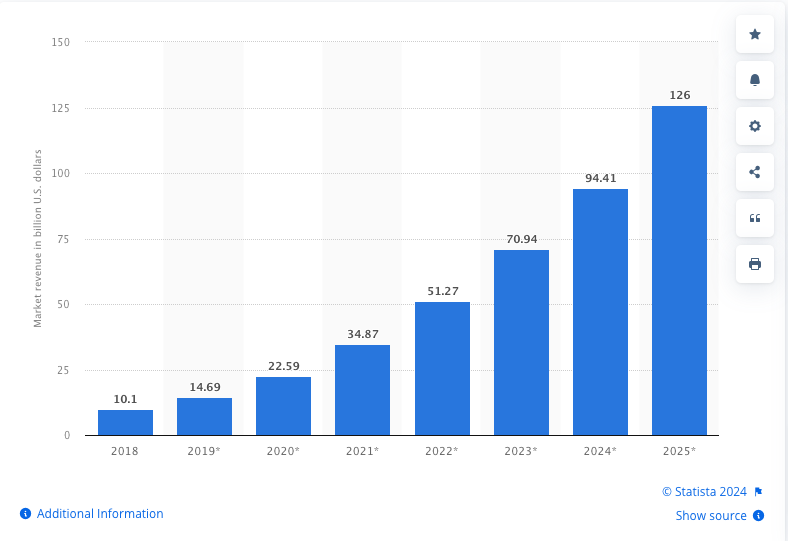
According to a recent report by Statista, the global AI software market is expected to reach $126 billion by 2025.
This explosive growth highlights the increasing importance and potential of AI technologies, including generative models.
Python's large and active community means there is a wealth of resources available, from tutorials and documentation to forums and online courses. This support network makes it easier to troubleshoot issues, share knowledge, and stay updated with the latest advancements in AI.
3. Simplicity and Readability:
Python's syntax is clean and readable, allowing developers to focus on the logic of their AI models rather than getting bogged down by complex code. This simplicity reduces development time and makes it easier to collaborate with others, even those who may not be as proficient in programming.
4. Integration Capabilities:
Python integrates seamlessly with other languages and technologies, making it a versatile choice for AI projects. Whether you need to interface with C++ for performance-critical tasks or use web frameworks like Flask and Django to deploy your models, Python's interoperability is a significant advantage.
Find out : How to integrate AI into an App
5. Popularity in Academia and Industry:
Python's popularity in both academia and industry ensures a continuous influx of new tools, libraries, and innovations. Many cutting-edge AI research papers and projects are implemented in Python, making it easier for practitioners to adopt the latest techniques.
6. Strong Support for Data Handling:
Handling and preprocessing data is a crucial step in building AI models. Python's libraries like pandas (for data manipulation), and Matplotlib and Seaborn (for data visualization), provide robust tools to clean, analyze, and visualize data effectively.
How To Develop Generative AI Model Using Python?
Developing a generative AI model involves several steps, from setting up your environment to training and evaluating your model.
Here, we'll outline the step-by-step process to guide you through creating a generative AI model using Python.
Step 1: Setting Up Your Python Environment
Before diving into code, ensure your environment is set up with the necessary tools. You'll need Python installed, along with libraries like TensorFlow or PyTorch, NumPy, and matplotlib.
Installing Dependencies
# Install required libraries
pip install tensorflow numpy matplotlib
Step 2: Data Preparation
The quality of your generative model depends heavily on the data you use. Gather and preprocess your dataset, ensuring it's clean and well-formatted. For this example, we'll use the MNIST dataset, a collection of handwritten digits.
Sourcing Data
There are several sources where you can find datasets for your generative models, such as Kaggle, UCI Machine Learning Repository, and Google Dataset Search. Ensure the data is relevant and of high quality.
Data Augmentation Techniques
To improve model performance and generalization, apply data augmentation techniques such as rotation, scaling, and flipping to artificially increase the size and diversity of your dataset.
import tensorflow as tf
from tensorflow.keras.preprocessing.image import ImageDataGenerator
# Load and preprocess the MNIST dataset
(x_train, _), (_, _) = mnist.load_data()
x_train = x_train.astype('float32') / 255.0
x_train = x_train.reshape(x_train.shape[0], 28, 28, 1)
# Data augmentation
datagen = ImageDataGenerator(rotation_range=10, zoom_range=0.1, width_shift_range=0.1, height_shift_range=0.1)
datagen.fit(x_train)
Step 3: Building the Generative AI Model
Let's build a simple GAN model using TensorFlow. We'll define the generator and discriminator networks.
Enhancing the GAN Architecture
Introduce advanced GAN architectures such as Conditional GANs (cGANs) and CycleGANs, which allow for more control over the generated data and enable style transfer.
from tensorflow.keras.models import Sequential
from tensorflow.keras.layers import Dense, Flatten, Reshape, Conv2D, Conv2DTranspose, LeakyReLU
# Define the generator model
def build_generator():
    model = Sequential([
        Dense(256, activation='relu', input_dim=100),
        Reshape((4, 4, 16)),
        Conv2DTranspose(128, (3, 3), strides=(2, 2), padding='same', activation='relu'),
        Conv2DTranspose(64, (3, 3), strides=(2, 2), padding='same', activation='relu'),
        Conv2DTranspose(1, (3, 3), strides=(2, 2), padding='same', activation='sigmoid')
    ])
    return model
# Define the discriminator model
def build_discriminator():
    model = Sequential([
        Conv2D(64, (3, 3), strides=(2, 2), padding='same', input_shape=(28, 28, 1)),
        LeakyReLU(alpha=0.2),
        Conv2D(128, (3, 3), strides=(2, 2), padding='same'),
        LeakyReLU(alpha=0.2),
        Flatten(),
        Dense(1, activation='sigmoid')
    ])
    return model
Advanced RNN Architectures
Discuss more advanced RNN architectures, like Bidirectional LSTMs and attention mechanisms, which can improve performance in sequential tasks.
from tensorflow.keras.models import Sequential
from tensorflow.keras.layers import LSTM, Dense, Bidirectional, Attention
from tensorflow.keras.preprocessing.text import Tokenizer
from tensorflow.keras.utils import to_categorical
import numpy as np
# Example text data
data = "hello world"
# Tokenize the text data
tokenizer = Tokenizer(char_level=True)
tokenizer.fit_on_texts([data])
encoded = tokenizer.texts_to_sequences([data])[0]
# Prepare input-output pairs
vocab_size = len(tokenizer.word_index) + 1
sequences = []
for i in range(1, len(encoded)):
    sequence = encoded[:i+1]
    sequences.append(sequence)
max_length = max([len(seq) for seq in sequences])
sequences = np.array([np.pad(seq, (0, max_length - len(seq)), 'constant') for seq in sequences])
X, y = sequences[:, :-1], sequences[:, -1]
y = to_categorical(y, num_classes=vocab_size)
# Define the RNN model with Attention
def build_rnn():
    model = Sequential([
        Bidirectional(LSTM(50, return_sequences=True), input_shape=(max_length-1, 1)),
        Attention(),
        Dense(vocab_size, activation='softmax')
    ])
    return model
# Reshape X for RNN input
X = X.reshape((X.shape[0], X.shape[1], 1))
rnn = build_rnn()
rnn.compile(optimizer='adam', loss='categorical_crossentropy')
rnn.fit(X, y, epochs=100, verbose=2)
Step 4: Training the Model
Now, we'll compile the GAN models and set up the training loop.
Handling Overfitting
Provide strategies to prevent overfitting, such as dropout, regularization, and data augmentation. Implementing these techniques can help your model generalize better to new data.
Hyperparameter Tuning
Discuss the importance of hyperparameter tuning and tools like Grid Search and Random Search to optimize model performance. Experiment with different learning rates, batch sizes, and network architectures.
from tensorflow.keras.optimizers import Adam
# Build and compile the discriminator
discriminator = build_discriminator()
discriminator.compile(optimizer=Adam(0.0002, 0.5), loss='binary_crossentropy', metrics=['accuracy'])
# Build the generator
generator = build_generator()
# Create the GAN model
gan = Sequential([generator, discriminator])
discriminator.trainable = False
gan.compile(optimizer=Adam(0.0002, 0.5), loss='binary_crossentropy')
# Training the GAN
import numpy as np
def train_gan(gan, generator, discriminator, epochs, batch_size, x_train):
    for epoch in range(epochs):
        # Train the discriminator
        idx = np.random.randint(0, x_train.shape[0], batch_size)
        real_imgs = x_train[idx]
        noise = np.random.normal(0, 1, (batch_size, 100))
        fake_imgs = generator.predict(noise)
d_loss_real = discriminator.train_on_batch(real_imgs, np.ones((batch_size, 1)))
        d_loss_fake = discriminator.train_on_batch(fake_imgs, np.zeros((batch_size, 1)))
        d_loss = 0.5 * np.add(d_loss_real, d_loss_fake)
# Train the generator
        noise = np.random.normal(0, 1, (batch_size, 100))
        g_loss = gan.train_on_batch(noise, np.ones((batch_size, 1)))
# Print the progress
        if epoch % 100 == 0:
            print(f"{epoch} [D loss: {d_loss[0]} | D accuracy: {100 * d_loss[1]}] [G loss: {g_loss}]")
# Train the GAN for 10,000 epochs with a batch size of 32
train_gan(gan, generator, discriminator, epochs=10000, batch_size=32, x_train=x_train)
Step 5: Evaluating and Tuning the Model
Evaluate the model's performance and adjust hyperparameters as necessary. Monitor the loss values and generated outputs to fine-tune the model for better results.
Metrics for GANs
Detail-specific evaluation metrics for GANs, such as Inception Score (IS) and Fréchet Inception Distance (FID). These metrics help in assessing the quality and diversity of the generated images.
Metrics for VAEs and RNNs
Discuss appropriate metrics for evaluating VAEs and RNNs, such as reconstruction error and perplexity. These metrics help understand how well the models perform in their respective tasks.
Step 6: Generating New Content
Once the model is trained, you can generate new content. For example, let's generate some new handwritten digits with the GAN and new text sequences with the RNN.
import matplotlib.pyplot as plt
# Generate new images
noise = np.random.normal(0, 1, (10, 100))
generated_images = generator.predict(noise)
# Plot the generated images
plt.figure(figsize=(10, 2))
for i in range(10):
    plt.subplot(1, 10, i+1)
    plt.imshow(generated_images[i, :, :, 0], cmap='gray')
    plt.axis('off')
plt.show()
# Generate new text sequences
def generate_text(model, tokenizer, max_length, seed_text, n_chars):
    result = seed_text
    in_text = seed_text
    for _ in range(n_chars):
        encoded = tokenizer.texts_to_sequences([in_text])[0]
        encoded = np.pad(encoded, (0, max_length - len(encoded)), 'constant')
        encoded = np.array(encoded).reshape(1, max_length, 1)
        yhat = model.predict_classes(encoded, verbose=0)
        out_char = tokenizer.index_word[yhat[0]]
        in_text += out_char
        result += out_char
    return result
# Generate new text based on a seed
seed_text = "hello"
generated_text = generate_text(rnn, tokenizer, max_length-1, seed_text, 20)
print(generated_text)
What Are The Use Cases of Generative AI Models?
Generative AI models have transformative applications across various industries, leveraging their ability to create new content that mimics real-world data.
- In image generation, AI enhances and creates realistic images for art, design, and photography.
- Text generation models like GPT-3 automate content creation and improve customer service through sophisticated chatbots.
- Moreover, music and audio synthesis applications enable AI to compose music and generate human-like speech, while in healthcare, generative models aid in drug discovery and medical imaging.
- In gaming, AI creates immersive environments and characters, enhancing player experiences. Fashion and retail industries benefit from AI's ability to design new clothing items and offer personalized shopping experiences.
For example, NVIDIA's StyleGAN generates realistic human faces for virtual influencers, OpenAI's GPT-3 assists in writing, Google's WaveNet synthesizes natural speech, and Insilico Medicine accelerates drug discovery.
Generative AI is reshaping these fields by boosting creativity, efficiency, and personalization.
Want To Build Your Build Your Gen AI Software Quickly?
We hope this guide has provided you with the insights and tools needed to start building your own generative AI models using Python. As you embark on this journey, keep exploring, experimenting, and pushing the boundaries of what's possible with generative AI.
Or if you want to speed up the creation of these Generative AI Models, Try CodeConductor, World's 1st AI Software Development Platform which allows you to create your own Gen AI Model in just a few minutes using production-ready code.
With CodeConductor.AI, you can bypass the complexities of setting up and training models, enabling you to focus on innovation and application. Embrace the power of AI to drive your projects forward quickly and efficiently.
Book a Free Demo

![How to Build a Generative AI Model Using Python [Guide 2026]](/_next/image/?url=%2Fuploads%2Fbuild-a-generative-ai-model-using-python-codeconductor.webp&w=3840&q=75)