Best Glide Alternative: Build Business Apps Using AI | CodeConductor
No-Code Development Platform
Best Glide Alternative: Build Business Apps Using AI
CodeConductor is the best Glide apps alternative for building website and mobile applications. In the fast-paced digital age, businesses and entrepreneurs seek efficient, user-friendly solutions to create their mobile applications. But, with so many tools and platforms out there, how do you choose...
Paul Dhaliwal
Founder & Chief Executive Officer · Updated Jun 8, 2026·11 min read
What You'll Learn
4 key concepts covered
1Why businesses seek Glide alternatives for mobile and web app creation.
2What Glide is and its key strengths for no-code app building.
3Glide’s main limitations, including customization, collaboration, and App Store publishing.
4How CodeConductor enables faster AI-powered app creation from simple text prompts.
Are you building apps with no-code tools but starting to feel limited by spreadsheet-driven workflows or basic automation? That’s a common situation for teams using GlideApps. It’s fast, visual, and great for turning simple data into working mobile or web apps. But as projects grow, many builders realize they need more flexibility, smarter automation, and deeper integrations than GlideApps can offer.
GlideApps makes it easy to create apps from spreadsheets, connect simple logic, and launch internal tools quickly. For founders, operators, and product teams experimenting with vibe coding tools, this simplicity can be a huge advantage. However, once apps require advanced workflows, AI-driven logic, or complex integrations with APIs and databases, the platform’s limitations become apparent.
That’s why many developers and teams start searching for a GlideApps alternative that supports more powerful AI workflows and scalable app architectures. In the broader ecosystem of modern vibe coding tools, builders are also comparing platforms when looking for a Kiro alternative, an Emergent alternative, a Google Opal alternative, or even a Google Antigravity alternative—especially when they want to move beyond quick prototypes into real production systems.
This is where CodeConductor.ai comes in. Instead of relying only on spreadsheet logic, CodeConductor enables teams to design intelligent workflows, connect multiple services, and build production-ready AI applications that scale with real business needs.
What Is GlideApps? & What Does It Offer?
GlideApps is a no-code app builder that turns spreadsheets into fully functional mobile or web applications. Instead of writing code, users connect a data source—such as a Google Sheet or Glide Table—design the interface with visual components, and publish the app instantly.
The platform is widely used to build internal tools, lightweight CRMs, directories, portals, and simple mobile apps. Many startups, operations teams, and founders rely on GlideApps to launch MVPs quickly or automate repetitive workflows without involving developers.
With GlideApps, you can:
Turn spreadsheets into apps by connecting Google Sheets or Glide Tables as the backend
Design interfaces visually using a drag-and-drop component builder
Store and manage data with built-in Glide Tables and storage
Create mobile-friendly apps using a mobile-first design system
Control access with simple user roles and permissions
Publish instantly with one-click deployment and hosting
Because of its simplicity, GlideApps is often the starting point for teams exploring vibe coding tools or rapid no-code app development. It enables fast prototyping and quick automation of internal workflows without needing engineering resources.
However, as apps become more complex—requiring advanced automation, multi-step workflows, or deeper integrations with APIs and external systems—many teams look for a GlideApps alternative that can support more scalable, intelligent applications.
Looking for the Best GlideApps Alternative in 2025?
GlideApps is a smart choice when your goal is to turn spreadsheets into simple internal tools fast. But once your app starts handling sensitive company data, cross-team workflows, or AI-driven decisions, the conversation changes. At that point, many teams are no longer just looking for another no-code builder. They are looking for a GlideApps alternative that can support scale, control, and security from day one.
This shift is happening across the entire vibe coding tool market. Teams may start with a lightweight builder for speed, but they quickly run into bigger questions about deployment, governance, access control, and data safety. That is why buyers searching for a Kiro alternative, an Emergent alternative, a Google Opal alternative, or a Google Antigravity alternative are often asking the same core question: which platform can help us build fast without losing control?
Many users start looking for a GlideApps alternative because they need:
More advanced app logic than spreadsheet-based workflows can handle
Deeper integrations with APIs, databases, cloud systems, and internal tools
Flexible deployment options across cloud, on-premises, or hybrid environments
Full code access and framework flexibility instead of being boxed into one setup
Production-ready scalability for apps that need to grow with the business
Stronger collaboration controls with roles, permissions, version tracking, and auditability
Enterprise-grade security for teams building apps around sensitive data
AI governance, so the company can control how AI is used across teams
This is where CodeConductor starts to separate itself.
CodeConductor is not just another vibe coding platform for building AI apps from prompts. It also supports the control layer that many companies now need when AI app creation moves beyond early experiments. Instead of locking teams into short-lived app sessions, CodeConductor supports:
Secure authentication and access control with RBAC, SSO support, and Keycloak-based identity management
Identity provider integration for controlled login and signup through approved external providers
Two-factor authentication (2FA) and multi-factor authentication (MFA) for stronger user verification
Encryption at rest and in transit, including AES-256 standards for data protection
Compliance-focused security practices aligned with standards such as GDPR, HIPAA, SOC 2, SOC 2 Type 2, and PCI
Dedicated hosting and deployment flexibility across cloud, on-premises, and hybrid environments
Version control, monitoring, backup, and recovery to reduce operational risk
No AI training on your code, helping teams keep proprietary logic and business data private
For IT and security teams, this matters because uncontrolled AI app building creates real business risk. Without governance, employees may paste internal data into external AI tools, teams may build apps inconsistently, and security leaders may have no visibility into which tools are being used or how company information flows. Every disconnected AI tool becomes another possible entry point for sensitive data.
That is why AI governance is becoming a major buying factor. Companies want to control which AI tools employees use, monitor how AI is applied, protect company data, and manage app creation from one place rather than across scattered tools.
CodeConductor is moving directly into that need. Alongside its AI app builder, it is adding a governance layer through systems such as Knolli and the Active Cogs Protocol. In practical terms, this gives organizations a way to centralize approved knowledge, control workflows, manage app-building standards, and monitor how AI systems operate across the business.
So when teams compare GlideApps with newer AI-native builders, the real question is no longer just, “Which tool helps us build faster?” The better question is, “Which platform helps us build AI apps fast while still giving us governance, security, and control?”
Get insights in your inbox!!
Weekly tips on building smarter apps. Join 8,200+ founders and builders.
No spam. Unsubscribe anytime. We respect your privacy.
That is why CodeConductor stands out as a strong GlideApps alternative in 2025. It combines the speed people want from a modern vibe coding platform with the security, deployment flexibility, and AI governance that growing teams cannot afford to ignore.
CodeConductor vs GlideApps – Deep Dive Feature Comparison
When teams begin comparing tools in the modern vibe coding ecosystem, they usually start with simple app builders like GlideApps. But as projects evolve, they also start evaluating other AI-powered builders and developer assistants.
Builders exploring alternatives often compare platforms such as Dyad, Goose AI, Den, Blackbox AI, and Cline. Each of these tools focuses on different parts of the AI development workflow—some assist with writing code, some help generate applications, and others focus on developer productivity.
However, many teams face the challenge that these tools often solve only one part of the development process. Some help generate code, some help debug, and others help prototype apps. But when a team wants to build complete AI-powered applications with governance, security, deployment flexibility, and integrations, they often need something broader.
That is where CodeConductor stands out.
Instead of focusing only on code generation or lightweight internal apps, CodeConductor works as a full-stack vibe coding tool—a platform where teams can move from prompt → application → deployment while maintaining governance and control.
Below is a deeper comparison of how GlideApps and CodeConductor differ.
In simple terms, GlideApps focuses on turning spreadsheets into apps, which works well for internal dashboards or lightweight tools.
CodeConductor, on the other hand, acts as a vibe coding platform for building real AI applications—combining prompt-based development, full-code customization, secure deployment environments, and enterprise governance controls.
For teams exploring the next generation of AI development tools—whether they are researching a Dyad alternative, Goose AI alternative, Den alternative, Blackbox AI alternative, or Cline alternative—CodeConductor provides a broader platform designed not just for coding assistance, but for building, deploying, and governing AI applications end to end.
Which One Should You Use: GlideApps or CodeConductor?
The right platform depends on what you are building, how complex your workflows are, and how much control your team needs over deployment, integrations, and AI usage.
For many builders, GlideApps is the starting point. It is simple, visual, and perfect for turning spreadsheets into quick internal tools. But when projects grow beyond basic workflows, teams often start evaluating more advanced AI development platforms.
That is where CodeConductor enters the conversation. Unlike traditional no-code tools, CodeConductor is a vibe coding platform designed to build complete AI-powered applications with governance, integrations, and flexible deployment.
Use GlideApps if you’re building quick internal tools
GlideApps is a strong option when speed and simplicity matter most.
It works well if:
You want to turn spreadsheets into simple mobile or web apps quickly
Your project is an internal dashboard, directory, or lightweight CRM
You prefer a visual drag-and-drop builder over coding
Your workflows rely mostly on spreadsheet logic and simple automation
Your app is small-scale and does not require deep integrations or AI orchestration
Goal: Launch a simple tool quickly without engineering complexity.
Use CodeConductor if you’re building scalable AI applications
CodeConductor is better suited for teams building AI-driven apps, automation systems, or complex digital products that need to grow with the business.
It is a better choice if:
You want to generate applications from prompts using AI-driven development
Your app requires advanced logic, workflows, and integrations
You need APIs, databases, and third-party tool connectivity
Your team requires enterprise-grade security, RBAC, MFA, and encrypted data handling
You want flexible deployment options across cloud, on-premise, or hybrid environments
Your organization needs AI governance to control how AI apps are built and used internally
Goal: Build production-grade AI applications that integrate with your systems and scale with your organization.
Real Feedback on GlideApps
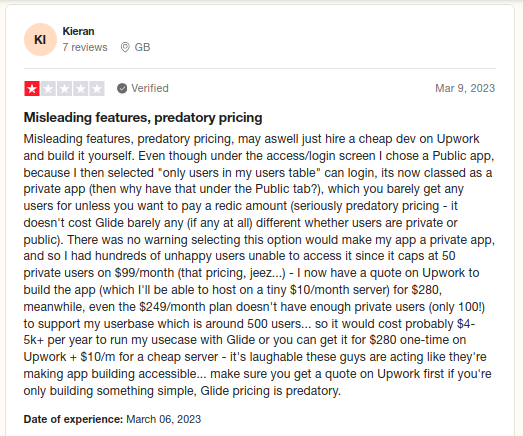
Glide, a no-code platform, has garnered mixed reviews from users, reflecting both its strengths and areas that could use improvement. One user appreciates the simplicity but expresses frustration with clients finding it challenging to backtrack and modify flagged questions. On the positive side, the platform's no-code nature is commended, and its integration with CRUD and APIs is highlighted as a time-saving feature. Users find value in the ability to create new tools that seamlessly communicate with Glide's internal tables.
However, the user experience with Glide's UI editor receives constructive criticism, with a call for its growth and enhancement. A notable limitation pointed out is the inability to assist clients in editing questions from the user's end, deviating from the expected flow outlined in the platform's documentation.
In terms of pricing, concerns are raised about the perceived high cost of the paid version about its limited form capabilities, especially in the free version. Users find it taxing to resolve flags or aid clients in the free version, which might hinder a seamless user experience.
Another user brings attention to a specific constraint: the inability to upload forms not in Glide's system without an upgrade. This limitation is particularly noted when using the free version, which, according to the user, is accessible to all REALTORS through their Association.
On a positive note, Glide is credited for simplifying the process of completing disclosures. Users find it instrumental in assisting sellers to provide thorough and accurate information when filling out disclosure forms.
Hence, Glide appears to offer a valuable service in simplifying disclosure processes, but improvements in user interface, pricing, and flexibility for form uploads may be essential for a more universally satisfying experience.
In a Nutshell: Which Is the Best GlideApps Alternative in 2025?
If you want a fast way to turn spreadsheets into simple apps, GlideApps is a great place to start.
But if your apps need to:
Handle complex workflows instead of simple spreadsheet logic
Integrate with APIs, databases, and enterprise tools
Deploy across cloud, on-premises, or hybrid environments
Protect sensitive company data with enterprise security
Control how AI is used across teams through governance
Scale into real production systems instead of internal prototypes
Then CodeConductor becomes a stronger long-term platform.
GlideApps helps you build quick internal tools from spreadsheets.
CodeConductor helps you build AI-powered applications with governance, security, and full deployment flexibility.
As companies move deeper into the era of vibe coding tools, the biggest shift is happening from simple no-code builders to platforms that support AI development with control and enterprise-grade infrastructure.
Ready to upgrade your app stack?
Explore CodeConductor and start building AI applications that scale with your business.
Best GlideApps Alternative
See how CodeConductor helps enterprises ship faster while staying compliant.
The best GlideApps alternative in 2025 depends on your needs. CodeConductor is a strong option for teams that need AI-powered development, enterprise security, flexible deployment, and governance features. While GlideApps works well for simple internal apps, CodeConductor is designed for building scalable AI applications.
Is CodeConductor a vibe coding platform?
Yes. CodeConductor can serve as a vibe coding platform by enabling teams to generate applications from prompts, integrate services, automate workflows, and deploy apps quickly. At the same time, it adds enterprise features, including governance, security controls, and flexible deployment environments.
What are other platforms similar to GlideApps?
Developers exploring the AI development ecosystem often evaluate several platforms. These may include Dyad, Goose AI, Den, Blackbox AI, and Cline. Each tool focuses on different aspects of AI-assisted development, such as coding assistance, automation, or application generation.
What is GlideApps?
GlideApps is a no-code platform that converts spreadsheets into functional mobile or web apps without requiring programming skills. Users can connect data sources like Google Sheets or Glide Tables, design the interface using drag-and-drop components, and publish the app instantly. It’s widely used for building internal tools, simple CRMs, directories, and lightweight business applications.
What is GlideApps used for?
GlideApps is mainly used to create simple mobile or web apps from spreadsheets without coding. Teams often use it to build internal tools, employee directories, lightweight CRMs, dashboards, inventory trackers, and MVP apps that automate basic workflows.
Is GlideApps free to use?
Yes, GlideApps offers a free plan that allows users to build and publish basic apps with limited features and usage. However, advanced capabilities, such as higher data limits, custom domains, team collaboration features, and enhanced integrations, are available only through paid plans.
Is GlideApps safe?
GlideApps includes standard security features, including user authentication, data access controls, and secure hosting. While it is considered safe for many internal tools and lightweight apps, organizations handling sensitive or regulated data may require additional governance, security controls, and compliance features depending on their requirements.
Key Takeaways
4 essential insights
Choose CodeConductor for AI-powered, text-to-app building with minimal effort.
Use Glide for quick spreadsheet-based apps, especially when budget is tight.
Switch if you need deeper customization and broader distribution beyond Glide limits.
Plan for growth by prioritizing platforms that scale and update data in real time.
Paul Dhaliwal is a tech innovator and Founder of CodeConductor, an open-source no/low-code platform. With 10+ years of experience in AI and scalable development, Paul focuses on crafting intelligent solutions that drive real-world value. A firm believer in the mantra "Eat, Sleep, Code, Repeat," he balances his passion for software with a love for travel and family.
⚡
Build your app
No coding. No designers. Just describe what you want and watch AI build it.