Base44 Integrations: What to Know About Credit Limits | CodeConductor
AI App Development
Base44 Integrations: What to Know About Credit Limits
Base44 integration credits can run out quickly when your app uses AI calls, file uploads, emails, SMS, image generation, Google Workspace tools, Slack, Zapier, Twilio, or other connected actions. This guide explains how Base44 integrations work, why users run out of integration credits, how credit limits affect app users, and when to upgrade or consider a Base44 alternative for credit-heavy AI apps.
If you are building an app in Base44 and suddenly see the warning “You’ve run out of integration credits,” you are not alone.
This is one of the biggest pain points I have seen with Base44, especially for users who are building apps that rely on AI actions, file uploads, emails, external tools, collaborators, or automated workflows. At first, Base44 feels simple because it lets you create an app quickly from prompts. But once your app starts using connected actions, those actions can consume integration credits faster than expected.
And this is where the problem becomes serious.
Running out of Base44 integration credits does not just affect the builder experience. It can affect real users inside your app. Some actions may stop working, automations may fail, collaborators may be limited, and teams may feel forced to upgrade just to keep the app functional.
In this guide, I’ll explain how Base44 integrations work, what Base44 integration credits are, why users run out of them, how credit usage affects apps, and what you can do to reduce unnecessary usage.
I’ll also cover when upgrading your Base44 plan makes sense and when it may be a sign that your app has outgrown Base44’s credit-based limits.
Base44 Integrations: Tools You Can Connect to Your App
Base44 integrations let you connect your app to external tools, services, and workflows without having to build each connection from scratch.
On its integrations page, Base44 separates integrations into two main types: Connectors and Manual Integrations.
Connectors are designed for easier setup. These are one-click integrations where you tell Base44 what you want to connect to, then authorize the tool. This is useful when you want to connect common business apps without having to handle API setup yourself.
Base44 lists connectors for tools such as Salesforce, Notion, Slack, Google Calendar, Google Drive, HubSpot, Google Sheets, Google Slides, Google Docs, LinkedIn, TikTok, Gmail, and Discord.
These integrations can help your app do things like:
Send emails or alerts from Gmail
Sync app data with Google Sheets
Store or export files to Google Drive
Connect CRM workflows with Salesforce or HubSpot
Send notifications to Slack or Discord
Create documents, slides, or calendar-based workflows
Connect Notion pages, databases, or content
Base44 also offers Manual Integrations, which are API-based integrations you configure with your own credentials. These are useful when the app needs a more specific connection or when the tool requires a separate API key.
Manual integrations listed by Base44 include Monday.com, OpenAI Text-to-Speech, HubSpot, Explorium, eToro, Giphy, BrightData, X, ElevenLabs, Resend, Twilio, Fal AI, and Zapier.
This makes Base44 more useful than a basic app builder because your app can connect to real tools your team already uses. But there is a tradeoff.
The more your app depends on integrations, the more likely you are to consume integration credits. Sending emails, triggering notifications, generating files, calling AI services, syncing data, or running connected workflows can all add to your usage.
That is why Base44 integrations are helpful, but they also need to be managed carefully. For simple MVPs, credit may not be a problem. For apps with real users, repeated actions, AI workflows, or team collaboration, integration credits can quickly become a scaling issue.
What Are Integration Credits in Base44?
Integration credits in Base44 are usage credits consumed when your app performs actions through integrations or connected services.
These credits are different from message credits. Message credits are used when you ask Base44’s AI builder to create, edit, or refine your app. Integration credits are used when the app itself performs an action, especially actions connected to AI tools, files, emails, SMS, image tools, or third-party services.
For example, Base44 integration credits may be used when your app:
Calls an LLM
Uploads or processes a file
Sends an email
Sends an SMS
Generates an image
Understands or analyzes an image
Triggers a connected tool or workflow
This means integration credits are not only used while you are building the app. They can also be used when real users interact with the app.
That is why integration credits matter for live apps. If your Base44 app depends on AI responses, uploads, notifications, emails, or third-party workflows, running out of integration credits can affect what users are able to do inside the app.
For simple MVPs, this may not feel like a major issue. But for apps with active users, repeated workflows, collaborators, or AI-heavy features, integration credits can become one of the biggest usage limits to watch.
What Are Base44 Integration Credits?
Base44 integration credits are the credits used when your app performs an action that relies on an integration.
In simple terms, message credits are used when you are building or editing the app with AI, while integration credits are used when the app itself takes connected actions on behalf of users.
Base44 says integration credits allow users to access integrations inside your application. These integrations can include LLM calls, file uploads, image understanding, image generation, email sending, SMS sending, and other connected actions.
For example, if a user clicks a button in your app and that click triggers an LLM call, it uses an integration credit. If your app sends an email, processes an uploaded file, generates an image, or runs another integration-based task, it can also use integration credits.
Base44 states that each integration request costs 1 credit, regardless of the integration used. That sounds simple, but it can become expensive in practice if your app triggers many actions.
This is why users often run out of Base44 integration credits faster than expected. Credits are not only used while you are building the app. They can also be used when real users interact with the app.
That means integration credits are not just a billing detail. They can directly affect how your app works, especially if your app depends on AI workflows, automations, file handling, emails, SMS, or third-party tools.
What Happens When You Run Out of Base44 Integration Credits?
When you run out of Base44 integration credits, your app may stop performing certain connected actions.
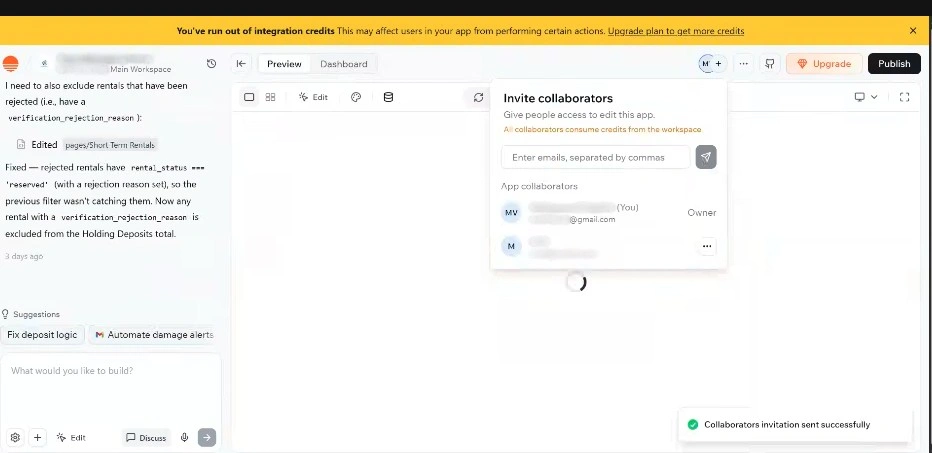
Base44 shows a warning message that says: “You’ve run out of integration credits. This may affect users in your app from performing certain actions.”
This warning matters because integration credits are not only tied to your building experience. They can affect what your live app can do.
For example, if your app depends on email, SMS, file uploads, LLM calls, image generation, image understanding, or third-party integrations, those actions may fail or stop working once your credits are exhausted.
This can create problems such as:
Users are not able to complete certain actions
AI workflows failing inside the app
File uploads or processing actions are not working
Emails or notifications are not being sent
Collaborators being blocked from testing connected features
Teams need to upgrade just to keep the app functional
From my view, this is where Base44 integration credits become more than a billing limit. They become a product risk.
If the app is only a prototype, running out of credits may be annoying but manageable. But if your Base44 app is already being used by customers, internal teams, or collaborators, running out of integration credits can interrupt real workflows.
That is why I would treat integration credit usage as something to monitor before launching or sharing a Base44 app with users.
Why Base44 Users Run Out of Integration Credits
Base44 users usually run out of integration credits when their app starts doing more than displaying simple pages or storing basic data.
The problem is that integration credits are not only used by the person building the app. They can also be used when app users, collaborators, or automated workflows trigger connected actions inside the app.
That means credit usage can grow faster than expected once your app becomes active.
1. App Users Trigger Integration Actions
One common misunderstanding is that credits are only used during development.
In reality, integration credits can be consumed when users interact with your Base44 app. If a user uploads a file, sends an email, triggers an AI response, generates an image, or starts a connected workflow, that action may use integration credits.
So even if you are not actively editing the app, your credits can still go down as people use it.
2. AI Features Use Credits Quickly
AI-heavy apps can burn through credits faster than simple apps.
If your Base44 app uses LLM calls, document analysis, image understanding, image generation, text-to-speech, or other AI-powered actions, each request can add to your usage.
This becomes a bigger issue when users test the same AI workflow repeatedly or when the app depends on AI for core functionality.
3. Repeated Testing Burns Credits
Testing is one of the easiest ways to use integration credits without realizing it.
For example, if you are debugging an upload flow, testing email delivery, checking an AI response, or trying to fix a workflow, every repeated test may trigger another integration request.
This can make iteration feel expensive, especially when the app is buggy or the same issue keeps coming back.
4. Collaborators Can Use Workspace Credits
If your Base44 workspace has collaborators, their activity can also contribute to credit usage.
This matters for teams because multiple people may be testing, previewing, editing, or triggering app workflows simultaneously. Even if each person uses only a few actions, the total usage can add up quickly across the workspace.
5. Complex Apps Need More Connected Actions
Simple dashboards may not use many integration credits. But apps with multiple connected workflows usually do.
For example, a client portal might upload files, send emails, notify a Slack channel, call an AI model, and update a Google Sheet. A single user flow can involve several connected actions.
That is why Base44 integration credits can become a scaling problem for apps that rely on automations, AI workflows, notifications, uploads, or third-party tools.
6. Credit Usage Can Grow After Launch
During the MVP stage, credit limits may feel manageable because only the builder is testing the app.
But once the app is shared with real users, usage becomes less predictable. More users mean more actions, more uploads, more AI calls, more notifications, and more chances to hit the credit limit.
This is why I would not treat integration credits as a small billing detail. For any Base44 app with real users, integration credit usage should be reviewed before launch, not after something stops working.
Base44 Integration Credits vs Message Credits
Base44 uses two types of credit: message credits and integration credits.
These credits are easy to confuse, but they affect different parts of your app-building experience.
Message credits are used when you interact with Base44’s AI builder. For example, when you ask Base44 to create a page, change a layout, fix an issue, add a feature, or refine your app, that usually uses message credits.
Integration credits are different. These are used when your app performs connected actions through integrations. That includes actions like sending emails, making LLM calls, uploading files, generating images, interpreting images, sending SMS messages, or triggering third-party tools.
Here is the simple difference:
Credit Type
Used For
Example
Message credits
Building, editing, or refining your app with AI
Asking Base44 to add a dashboard, fix logic, or change the UI
Integration credits
Connected actions inside your app
Sending an email, calling an LLM, uploading a file, or generating an image
Get insights in your inbox!!
Weekly tips on building smarter apps. Join 8,200+ founders and builders.
No spam. Unsubscribe anytime. We respect your privacy.
The biggest difference is where the credits are used.
Message credits are mostly tied to the builder experience. They matter when you are creating or editing the app.
Integration credits can affect the app experience itself. They matter when the app is being used by you, your team, or real users.
That is why running out of message credits may slow down development, but running out of Base44 integration credits can stop parts of the app from working.
For example, you may still be able to view your app, but users may not be able to send emails, process files, trigger AI responses, or complete workflows that depend on integrations.
This is why I would track both credit types separately. Message credits tell you how much building capacity you have left. Integration credits tell you how much connected app activity your workspace can still support.
How to Check Base44 Credit Usage
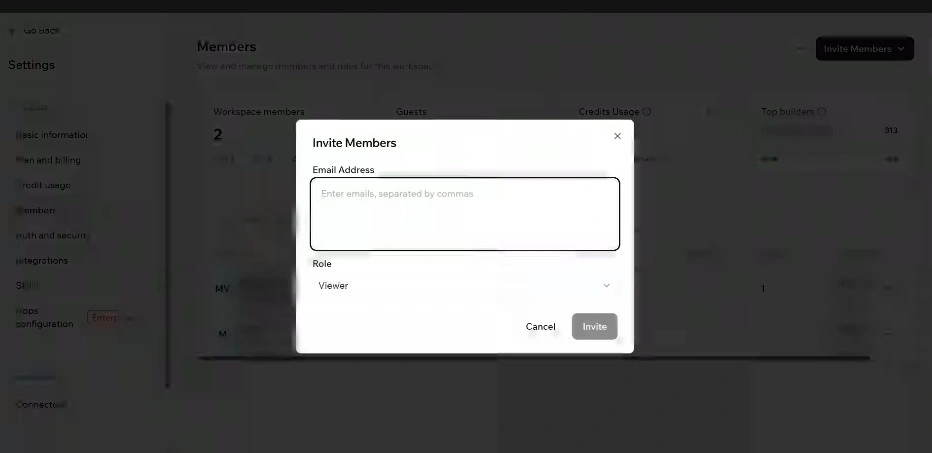
You can check Base44 credit usage in your workspace settings, especially in the members, billing, and credit usage sections.
From the Base44 workspace view, look for the left-side menu or settings area where you can access options such as Members, Credits Usage, and Plan and billing. The Credits Usage section is the most important place to review how your workspace credits are being used.
This section helps you understand whether your integration credits are being used by app activity, team testing, collaborators, or connected workflows.
When checking Base44 credit usage, I would review:
How many integration credits are left
Whether credits are being consumed quickly
Which apps or workflows are triggering connected actions
Whether collaborators are testing credit-heavy features
Whether usage is coming from real users or repeated internal testing
Whether AI actions, file uploads, emails, SMS, or third-party integrations are driving usage
Checking credit usage matters because Base44 apps can consume credits even when you are not actively editing the app. If real users are triggering workflows, uploading files, sending emails, or using AI-powered features, your integration credits can decrease in the background.
This is why I would not wait until the warning appears. If your Base44 app depends on integrations, check credit usage during development, before launch, and after sharing the app with users.
For teams, this is even more important. Multiple collaborators testing the same workflow can create unexpected credit usage. A simple test repeated across several team members can quickly turn into a larger workspace-level credit problem.
How to Reduce Base44 Integration Credit Usage
You cannot avoid integration credits completely if your Base44 app depends on connected actions. But you can reduce unnecessary usage by being more careful with testing, workflows, AI calls, collaborators, and app behavior.
The goal is not to remove every integration. The goal is to stop wasting credits on repeated, duplicate, or low-value actions.
1. Test Workflows Carefully
Repeated testing can quickly use up integration credits.
Before testing an integration-heavy workflow, check what the action actually triggers. For example, one button click may send an email, call an LLM, upload a file, update a sheet, or trigger another connected service.
If you test the same flow ten times, you may consume ten times the credits.
A better approach is to test small changes one at a time. Fix the logic first, then run the full integration workflow only when needed.
2. Limit Unnecessary AI Calls
AI actions can be useful, but they can also quickly increase integration credit usage.
If your app calls an LLM every time a user opens a page, submits a form, clicks a button, or refreshes a workflow, credits can disappear quickly.
To reduce usage, avoid duplicate AI calls. Use AI only when it adds clear value. For example, do not generate a new AI response if the same result can be derived from existing data, stored, or reused.
This matters even more for apps that use document analysis, image understanding, image generation, or text-to-speech.
3. Review Collaborator Access
Collaborators can also increase workspace-level usage.
If multiple team members are testing the same app, checking the same workflow, or triggering connected actions, integration credits can be used faster than expected.
Review who has access to the workspace and app. Remove inactive collaborators, limit access to unnecessary testing, and ensure team members understand which actions consume credits.
For larger teams, it helps to assign one person to test integration-heavy workflows rather than letting everyone repeatedly test the same feature.
4. Simplify Connected Workflows
Some Base44 apps use more credits because the workflows are too complex.
For example, a single user action might trigger an AI response, send an email, update a CRM, upload a file, and send a Slack notification. That may be useful, but it can also lead to higher credit use.
Review your workflows and remove steps that are not essential. Combine actions where possible. Avoid triggering multiple integrations when a single action is sufficient.
A simpler workflow is usually easier to maintain and cheaper to run.
5. Monitor Credit Usage Before Launch
Do not wait until your app is live to check integration credit usage.
Before sharing your Base44 app with users, test the main workflows and watch how credits change. This gives you a better idea of how many credits your app may use when real users start interacting with it.
Pay close attention to high-usage features such as uploads, AI responses, image tools, emails, SMS, and third-party app syncs.
If credits drop quickly during testing, they will likely drop even faster after launch.
6. Upgrade Only When the App Still Fits Base44
Upgrading your Base44 plan can give you more integration credits, but it may not solve the deeper issue.
If your app is working well and you only need higher usage limits, upgrading may make sense.
But if you are upgrading because the app keeps breaking, workflows are hard to control, credits are unpredictable, or you need more backend flexibility, then the problem may not be the plan. The problem may be that your app has outgrown Base44’s credit-based model.
In that case, it may be better to compare Base44 with a platform that gives you more control over integrations, app logic, deployment, and long-term scaling.
The goal is not only to see how many credits are left. The goal is to understand which actions are using them, so you can decide whether to reduce usage, simplify workflows, upgrade your Base44 plan, or consider moving to a more scalable setup.
Should You Upgrade Your Base44 Plan for More Integration Credits?
Upgrading your Base44 plan can help if your main problem is usage volume.
Base44’s paid plans give you more integration credits than the Free plan. For example, the Starter plan gives you 2,000 integration credits per month, Builder gives you 10,000, Pro gives you 20,000, and Elite gives you 50,000 integration credits per month when billed annually.
So if your app is working well and you only need more room for users, workflows, file uploads, emails, AI calls, or connected actions, upgrading can be a practical fix.
Base44 also says users can upgrade to a higher-tier plan from the billing dashboard to avoid interruptions in app development and usage.
But upgrading is not always the right answer.
Before upgrading, I would ask one simple question: Are you running out of credits because the app is growing, or because the workflow is inefficient?
If your app has real users, clear demand, and predictable credit usage, upgrading may make sense. In that case, the credit limit is just part of scaling the app.
But if you are using credits due to recurring bugs, failed tests, duplicate AI calls, confusing workflows, or unstable integrations, upgrading may only make the problem more expensive.
Upgrade Base44 if:
Your app is working well
Users are actively using connected features
Credit usage is predictable
You understand which workflows consume credits
You only need higher monthly limits
Base44 still fits your app’s long-term needs
Think twice before upgrading if:
You keep burning credits during debugging
AI workflows are unstable or hard to control
Users are blocked by failed connection actions
You need deeper backend control
You need private hosting or a more flexible deployment
You are already planning a Base44 migration
Your app is becoming business-critical
My take is simple: upgrade when credits are the only limit. Do not upgrade just to cover up deeper platform limits.
If Base44 still gives you the speed, control, and reliability you need, a higher plan can keep your app moving. But if integration credits are becoming unpredictable, expensive, or risky for live users, it may be time to compare Base44 with a more scalable platform before incurring further costs.
When Integration Credits Become a Scaling Problem
Base44 integration credits may feel manageable when you are building a prototype, testing an MVP, or using the app with a small team.
The problem starts when the app becomes active.
Once real users begin using AI workflows, uploads, notifications, emails, SMS, third-party tools, or automated actions, credit usage becomes harder to predict. A workflow that looked cheap during testing can become expensive when it runs dozens or hundreds of times.
This is where integration credits can turn from a simple usage limit into a scaling problem.
For example, a single app flow might include:
A user uploads a file
The app calls an LLM to analyze the file
The app sends an email confirmation
The app updates a Google Sheet
The app sends a Slack notification
That may look like a single user action on the front end, but behind the scenes, it can trigger multiple related actions. If many users repeat that same flow, integration credit usage can rise quickly.
This matters because running out of credits can affect the app experience. Users may not care why a workflow failed. They only see that the app did not complete the action.
For internal tools, this can slow down team operations. Client portals can create trust issues. For SaaS-style products, it can interrupt customer workflows and make costs harder to control.
Integration credits become a scaling problem when:
Credit usage grows faster than expected
More users create more connected actions
AI workflows depend on repeated LLM calls
Testing and debugging consume too many credits
App features stop working when credits run out
Teams feel forced to upgrade before the app is stable
Credit limits make production usage harder to predict
This does not mean Base44 is a bad option for every app. It can still be useful for fast MVPs, prototypes, and simple internal tools.
But if your app depends heavily on integrations, credit limits need to be part of your planning. You should know how many connected actions your app triggers, how often users trigger them, and whether the cost makes sense as the app grows.
If the answer is unclear, integration credits may become a bottleneck before the app is ready to scale.
Best Base44 Alternative for Credit-Heavy AI Apps: CodeConductor
If your Base44 app is running into integration credit limits, the first option is usually to reduce usage or upgrade your plan.
But if your app depends heavily on AI workflows, connected tools, backend logic, file handling, notifications, or user-triggered automations, you may need more than a higher credit limit.
That is where a Base44 alternative like CodeConductor can make more sense.
Base44 is useful when you want to build an app quickly from prompts. It works well for prototypes, MVPs, simple dashboards, internal tools, and early app ideas. But when the app becomes more complex, credit-based limits can create pressure. Every connected action starts to matter. Every repeated test can use credits. Every real user can increase usage.
CodeConductor is a better fit for teams that want more control over how their app logic, integrations, AI workflows, and deployment are handled.
Production apps that need to scale beyond prototype limits
The difference is simple.
Base44 helps users move fast at the start. CodeConductor is built for users who need more control as the app grows.
If your app only needs a few connected actions, Base44 may still be enough. But if your users depend on integrations every day, or if running out of credits can disrupt critical workflows, it is worth comparing Base44 with a platform better suited for long-term scaling.
A Base44 migration may also make sense if your current app is already useful, but the platform limits are slowing you down. Instead of rebuilding everything from scratch without a plan, you can use the migration process to rethink app logic, improve workflows, reduce reliance on fragile, credit-heavy actions, and prepare the app for more serious use.
My take is this: do not leave Base44 only because you hit a credit warning once. But if integration credits keep becoming a blocker, that is usually a sign your app has moved beyond the quick-build stage.
Base44 integrations make apps more useful by connecting them to tools like Gmail, Google Sheets, Slack, Google Drive, HubSpot, Salesforce, Twilio, Zapier, AI services, and other external workflows.
But those connected actions also come with a tradeoff: integration credits.
When your app is small, Base44 integration credits may not feel like a big issue. But once real users, collaborators, AI workflows, file uploads, emails, SMS, notifications, and third-party tools are integrated into the app experience, credit usage can grow quickly.
The main risk is not just running out of credits. The bigger risk is that important app actions may stop working when credits are gone.
That is why I would treat Base44 integration credits as a scaling factor rather than just a billing detail. Before launching or widely sharing a Base44 app, check your usage, test connected workflows carefully, reduce unnecessary AI calls, review collaborator access, and understand which actions consume credits.
Upgrading your Base44 plan can help if your app is working well and you only need higher limits. But if you are constantly running into credit warnings, unstable workflows, backend limits, or migration concerns, it may be a sign that your app has outgrown Base44.
For teams building credit-heavy AI apps, CodeConductor can be a stronger next step. It gives growing teams more control over app logic, integrations, workflows, deployment, and long-term scalability.
FAQs
What are Base44 integrations?
Base44 integrations are connections that let your app work with external tools and services. These can include tools like Gmail, Google Sheets, Google Drive, Slack, HubSpot, Salesforce, Twilio, Zapier, AI services, and other workflow platforms.
What are Base44 integration credits?
Base44 integration credits are used when your app performs connected actions through integrations. These actions can include LLM calls, file uploads, image generation, image understanding, email sending, SMS sending, and third-party tool actions.
Why did I run out of Base44 integration credits?
You may run out of Base44 integration credits if your app uses many connected actions. Credits can be consumed by real users, collaborators, repeated testing, AI workflows, file uploads, emails, SMS, and third-party integrations.
What happens when Base44 integration credits run out?
When Base44 integration credits run out, some app actions may stop working. Users may not be able to complete workflows that depend on integrations, such as sending emails, uploading files, triggering AI responses, generating images, or using connected tools.
Are Base44 integration credits the same as message credits?
No. Message credits are used when you build, edit, or refine your app with Base44’s AI builder. Integration credits are used when the app performs connected actions, such as calling an LLM, sending an email, uploading a file, or triggering an integration.
Do Base44 collaborators consume integration credits?
Yes, collaborators can contribute to workspace credit usage if they trigger integration-based actions while testing, previewing, or using the app. This is why teams should monitor credit usage when multiple people share the same workspace.
Which Base44 integrations can use credits?
Base44 integrations that trigger connected actions can use credits. This may include AI calls, file uploads, email tools, SMS tools, image tools, Google Workspace apps, CRMs, Slack, Zapier, Twilio, and other third-party integrations connected to your app.
How can I reduce Base44 integration credit usage?
You can reduce Base44 integration credit usage by limiting unnecessary AI calls, avoiding repeated testing, simplifying workflows, reviewing collaborator access, monitoring usage before launch, and removing duplicate or low-value connected actions from your app.
Should I upgrade Base44 for more integration credits?
Upgrading Base44 can make sense if your app is working well and you only need higher usage limits. But if you are burning credits because of bugs, unstable workflows, backend limits, or repeated failed tests, upgrading may only make the problem more expensive.
Can Base44 integration credit limits affect app users?
Yes. Base44 integration credit limits can affect app users if the app depends on connected actions. When credits run out, users may not be able to complete workflows that require AI calls, uploads, emails, SMS, image tools, or third-party integrations.
Is Base44 good for credit-heavy AI apps?
Base44 can work for early MVPs and simple AI apps, but credit-heavy AI apps may run into scaling issues. Apps with repeated LLM calls, file processing, automations, notifications, and user-triggered workflows need careful credit planning.
What is the best Base44 alternative for apps with heavy integrations?
CodeConductor is a strong Base44 alternative for teams building apps with extensive integrations, AI workflows, backend logic, and production-scale needs. It is better suited for teams that need more control over workflows, deployment, app logic, and long-term growth.
Monitor integration credit usage early, especially for AI, uploads, and automations.
Limit unnecessary connected actions to prevent real users facing broken workflows.
Use connectors for quick setup, but track how each action consumes credits.
Upgrade plans only when usage is unavoidable or your app outgrows credit limits.
Written by
Paul Dhaliwal
Founder & Chief Executive Officer
Paul Dhaliwal is a tech innovator and Founder of CodeConductor, an open-source no/low-code platform. With 10+ years of experience in AI and scalable development, Paul focuses on crafting intelligent solutions that drive real-world value. A firm believer in the mantra "Eat, Sleep, Code, Repeat," he balances his passion for software with a love for travel and family.
⚡
Build your app
No coding. No designers. Just describe what you want and watch AI build it.