What happens when an MCP tool returns more information than an AI agent can actually process?
As Model Context Protocol (MCP) deployments grow, that question is becoming a practical engineering problem, not an edge case.
In July 2026, the MCP project reported that its Tier 1 SDKs were seeing close to half a billion downloads per month, while both the TypeScript and Python SDKs had surpassed 1 billion total downloads (Source).
But connecting more tools does not automatically make an agent more effective.
Anthropic documents that tool-use overhead includes the tools parameter (tool names, descriptions, and input schemas) plus tool_use and tool_result content blocks, meaning tool definitions and results contribute to token usage (Source).
Effective MCP tool design therefore goes beyond exposing an API. Tool scope, descriptions, input schemas, response limits, pagination, errors, and discovery all influence whether an AI agent can select the right tool, use it correctly, and preserve enough context to complete the task reliably.
How to Write MCP Tool Names, Descriptions & Input Schemas
Once an MCP tool has a clear responsibility, its definition needs to tell the model exactly how the capability works and what arguments are valid.
Under the MCP 2026-07-28 specification (officially released July 28, 2026), a tool definition can include a unique name, human-readable description, inputSchema, optional outputSchema, and additional metadata. The inputSchema must be valid JSON Schema, with JSON Schema 2020-12 used by default when no other dialect is specified.
Follow MCP Naming Rules
Beyond choosing a meaningful name, MCP treats the tool name as a unique identifier, and in practice, clients may impose additional naming or compatibility constraints.
In practice, tool names should:
Be 1–128 characters long
Be case-sensitive
Use letters, numbers, underscores, hyphens, or periods
Avoid spaces and unsupported special characters
Be unique within the MCP server
Examples of valid names include:
customer.search
get_customer
orders-list
If a client aggregates tools from multiple servers, it should apply a deterministic namespacing or disambiguation strategy, such as prefixing names with a server identifier.
Write Descriptions as Instructions, Not Labels
A tool description should provide information the model cannot learn from the name alone.
Instead of:
search_customer - Searches customers.
Give the agent operational guidance:
search_customer - Search existing customer records by email, name, or customer ID. Returns matching customer IDs and basic profile information.
Useful descriptions clarify:
what inputs the tool expects
what kind of result it returns
domain-specific terminology the model may not know
important format or usage requirements
constraints that could otherwise cause an invalid call
Anthropic recommends writing tool descriptions much like instructions for a new team member: make implicit conventions explicit rather than expecting the model to infer them. Its testing also found that refinements to tool descriptions and specifications can materially affect agent performance.
Constrain Inputs With JSON Schema
Descriptions explain an interface; schemas enforce its structure.
The current MCP specification permits JSON Schema–based inputSchema definitions, with JSON Schema 2020-12 used by default.
It allows MCP developers to express more than basic string or number types, although client support for advanced features such as oneOf, anyOf, allOf, conditional schemas, $ref, and $defs may vary.
For agent-facing tools, use constraints where they remove a real source of ambiguity:
required for inputs the operation cannot run without
enum when only a known set of values is valid
numeric bounds for limits, counts, or ranges
array and object schemas for structured parameters
conditional schemas when one input changes what other fields are valid
For example, instead of defining status as an unrestricted string, constrain it to known values:
{
  "type": "string",
  "enum": ["pending", "processing", "shipped", "cancelled"]
}
Parameter names should also describe exactly what value is expected. Anthropic specifically recommends unambiguous fields such as user_id rather than a generic parameter such as user.
Complex schemas should still be used selectively. JSON Schema 2020-12 can express deeply nested conditions and references. In practice, bound schema complexity where possible, because composition and reference resolution can increase validation cost and reduce client compatibility.
Use Examples for Conventions the Schema Cannot Convey Clearly
A schema can validate structure without fully communicating the convention behind a value.
Examples are especially useful for:
date ranges
search expressions
domain-specific identifiers
filter syntax
combinations of optional parameters
specialized query formats
For example, defining date_range as a string tells the model its data type. Showing:
2026-09-01/2026-09-14 also communicates the expected convention.
Anthropic recommends including examples, edge cases, and input-format requirements when those details help models use tools correctly, and its testing shows that refinements to tool descriptions and specifications can materially affect agent performance.
The objective is not to make the definition longer. It is to reduce decisions the model has to guess by expressing valid inputs as clearly and precisely as possible.
How to Keep MCP Tool Responses Context-Efficient
Tool responses share the agent’s context window with instructions, conversation history, retrieved information, and results from other calls. Large or noisy outputs can therefore reduce the amount of useful context available for reasoning.
Anthropic recommends techniques such as filtering, pagination, range selection, and truncation for tools that may return large responses. Claude Code, for example, limits tool responses to 25,000 tokens by default, although this is a Claude Code product limit rather than an MCP protocol limit.
Return Only the Fields the Agent Needs
Backend APIs often contain more information than the current task requires. Passing complete API responses through an MCP tool can add nested metadata and unrelated fields without helping the agent make its next decision.
For large-result tools, consider supporting:
Sensible default result limits
Hard maximum result counts
Server-side filters
Field selection or projection
Date and range constraints
Summaries or aggregates when individual records are unnecessary
For example, if an agent is identifying delayed orders, a search_orders response may only need:
Order ID
Customer name
Shipment status
Expected delivery date
Internal audit fields, unrelated billing data, and other metadata can stay out of the response unless the agent explicitly needs them later.
Paginate Large Results and Make Continuation Explicit
Search tools for logs, tickets, files, transactions, or other growing collections should not assume every matching record belongs in one response.
A bounded retrieval pattern can expose:
Get insights in your inbox!!
Weekly tips on building smarter apps. Join 8,200+ founders and builders.
No spam. Unsubscribe anytime. We respect your privacy.
A default limit
A maximum page size
Filters that narrow the result set
A cursor or continuation token
An explicit signal when more results remain
For example:
search_logs(query, limit=50, cursor=...)
gives the agent control over how much additional data it retrieves.
If a result is limited, make that visible rather than silently dropping records. A response might state: 50 of 327 matching records returned. More results are available. It should then provide the cursor or other information needed to continue.
This allows the agent to decide whether another page is necessary instead of receiving the full dataset by default.
Return References for Large Files and Payloads
Some outputs are naturally too large to embed directly in a tool response, including:
log archives
large documents
source files
generated reports
media
extensive datasets
In these cases, return a resource reference, URI, file identifier, or retrievable handle along with enough metadata for the agent to understand what it points to.
For example, a result could include:
This creates a useful retrieval pattern: return the smallest useful result first, then expose a clear path to deeper data when the task requires it.
How to Design MCP Outputs and Errors for Agent Workflows
A successful MCP tool call should return information in a form the agent can interpret reliably and use in its next action. For multi-step workflows, that means defining predictable outputs, preserving necessary state explicitly, and making failures recoverable.
Define Predictable Structured Outputs
Free-form text works when the agent only needs to read an answer. When another tool or system needs to consume the result, a machine-readable structure is more reliable.
For example, instead of returning:
Customer found. Account 83921 is active.
the tool can return:
{
  "customer_id": "83921",
  "status": "active"
}
MCP supports structuredContent, and tools can declare an outputSchema to describe the expected result. In the MCP 2026-07-28 specification, structuredContent can be any JSON value that conforms to the declared outputSchema, rather than being limited to an object. For compatibility with clients that do not consume structured content, servers should also include an equivalent serialized representation in a text content block when required by the target specification, client, or SDK.
Structured outputs are particularly useful for:
IDs and resource references
Statuses and state values
Timestamps and dates
Quantities and totals
Arrays of records
Values that downstream tools need to consume directly
Field names and types should also remain stable. If customer_id identifies a customer in one response, changing the same concept to id, customer, or record_id elsewhere creates unnecessary interpretation work for the agent.
An output schema therefore serves as a result contract: it defines what downstream consumers can expect after the tool succeeds.
Pass Explicit Handles Between Tool Calls
Multi-step workflows often need to carry a resource or operation from one tool call into the next.
For example:
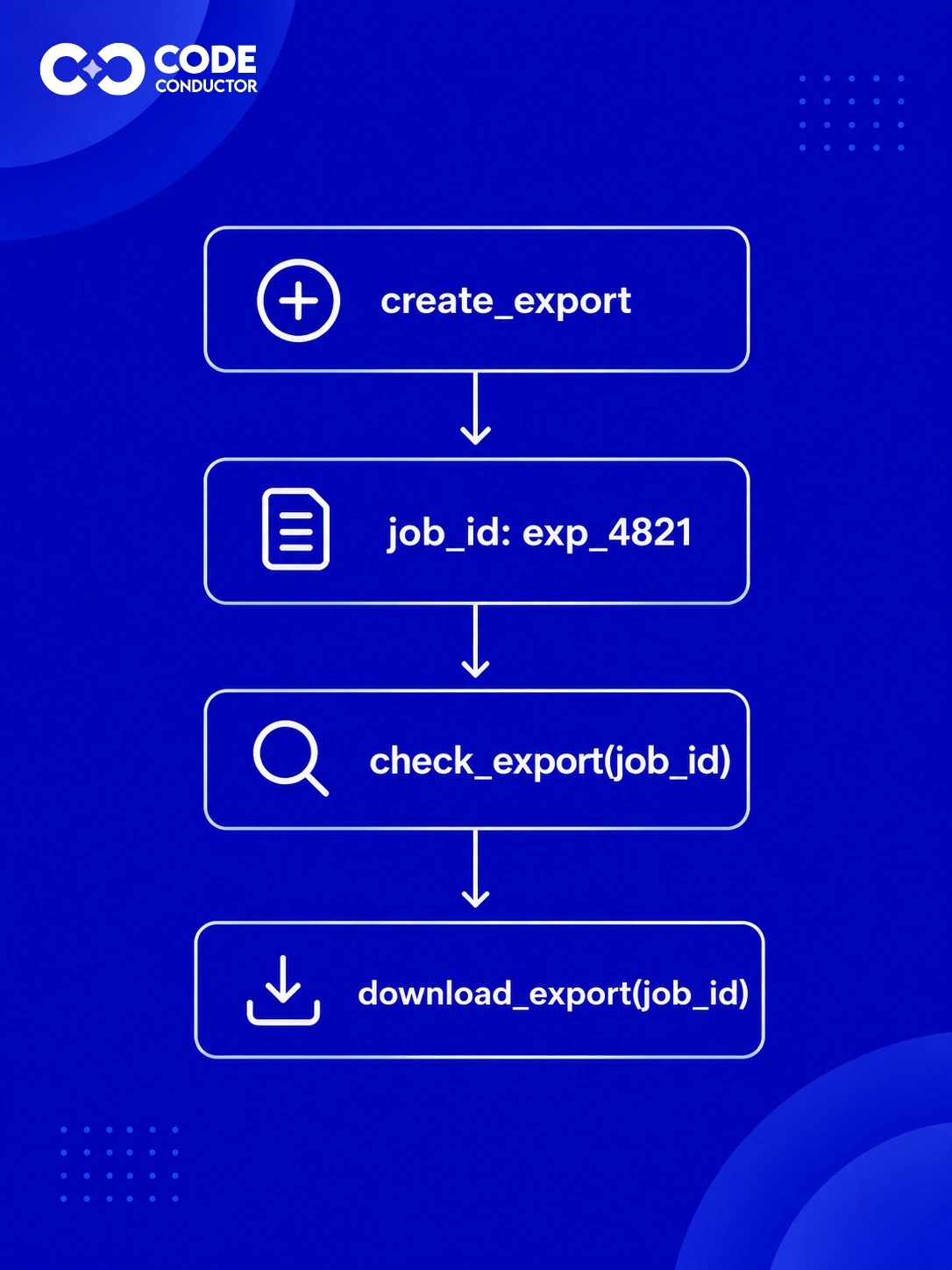
The MCP 2026-07-28 specification defines a stateless protocol model in which each request carries the metadata needed to process it. Clients and servers may still support legacy initialization semantics for backward compatibility, but application workflows should not depend on hidden connection-level state.
When later actions depend on something created or discovered earlier, return an explicit handle such as:
customer_id
order_id
job_id
basket_id
document_id
Subsequent tools should accept that same identifier directly.
This is preferable to making the agent:
Search for the resource again
Infer an identifier from descriptive text
Reconstruct state from previous responses
Depend on an undocumented server-side session
For long-running or stateful operations, an opaque handle can represent the underlying state while keeping the agent-facing workflow simple.
Return Errors the Agent Can Act On
MCP distinguishes between protocol errors and tool execution errors.
Protocol errors represent problems with the MCP request itself, such as an unknown tool, malformed request, or server-level problem. These are returned as JSON-RPC errors.
Tool execution errors occur after the request has been accepted for tool execution and can include:
These failures may be returned in the tool result with isError: true, allowing the model to see the problem and adjust its next attempt. Malformed requests or invalid tool-call arguments may instead be reported as JSON-RPC errors, depending on the implementation.
For example, avoid returning only: Error 422
Instead, provide an actionable response such as:
> Invalid departure_date. The date must be in the future. Provide a future date and retry.
A useful agent-facing error should communicate:
what failed?
which value or condition caused the failure?
what the valid requirement is?
whether and how the agent can retry?
Anthropic likewise recommends specific, actionable error responses rather than opaque codes or raw tracebacks, because clear feedback allows an agent to correct its tool call instead of repeatedly failing.
The key distinction is straightforward: structured outputs tell the agent what happened successfully; explicit handles preserve what it needs next; actionable errors tell it how to recover when execution fails.
How to Scale and Test MCP Tool Catalogs
As an MCP implementation grows, the challenge shifts from designing individual tools to managing the catalog as a whole. Exposing too many tool definitions at once can consume useful context and make it harder for an agent to identify the capability relevant to the current task.
Use Progressive Discovery for Large Tool Libraries
Large catalogs do not always need to expose every tool to the model upfront. Progressive discovery allows the agent to access specialized capabilities only when they become relevant.
A practical flow is:
Keep essential tools immediately available.
Identify the capability required for the task.
Search or discover relevant tools.
Load only the required definitions into active context.
This keeps the broader tool library accessible without requiring the model to carry every definition throughout the workflow.
Keep Core Tools Available and Defer Specialized Tools
Progressive discovery should not add unnecessary friction to common tasks.
A practical catalog can use two layers:
For example, a coding agent might keep repository search and file operations readily available while deferring deployment, billing, incident-management, or infrastructure-specific tools.
Distinguish MCP Discovery From Model-Side Tool Search
MCP enables servers to expose available tools and clients to discover those capabilities via tools/list, which supports pagination and can notify clients when the available tool list changes. However, deciding which tool definitions should enter the model’s active context is generally handled by the client, host, or agent platform.
The responsibilities can be separated as follows:
MCP server: exposes available capabilities.
MCP client or host: discovers and manages those tools.
Agent runtime: determines which tools the model needs for the current task.
Progressive tool search is therefore an architectural strategy used alongside MCP, not automatic behavior provided by every MCP server.
Test Tool Selection With Real User Prompts
A valid schema does not guarantee that an agent will choose the correct tool.
Test the catalog using realistic prompts that include:
straightforward requests with one clear tool
ambiguous requests that could match multiple capabilities
workflows requiring several tools
requests where no tool should be called
This reveals whether the tool catalog works from the agent’s perspective rather than only at the protocol level.
Measure Invalid Arguments, Retries, and Failed Calls
Production behavior can reveal weaknesses that are difficult to detect from tool definitions alone.
Monitor patterns such as:
wrong-tool selections
invalid or missing arguments
repeated calls to the same tool
retries after execution failures
unnecessary tool calls
Recurring problems can indicate that a description, schema, discovery strategy, or recovery path needs refinement.
Track Context Usage, Latency, and Task Completion
Individual tool success is only one part of agent performance. Evaluation should also consider:
context consumed by tool definitions and results
latency introduced by discovery and execution
number of calls required to complete a workflow
end-to-end task completion
The goal is to make the full catalog accessible while helping the agent find the right capability, use it correctly, and complete the task efficiently.
Conclusion
Effective MCP tool design helps agents choose the right capability, use it correctly, and avoid unnecessary context overhead. Clear schemas, bounded outputs, structured responses, and scalable discovery all contribute to more reliable workflows.
For coding agents, Harmony MCP adds persistent, structured codebase context so agents can retrieve relevant implementation knowledge without repeatedly rebuilding repository understanding.
Explore Harmony MCP to make coding-agent workflows more context-efficient and reliable!
FAQs
How many MCP tools should an AI agent have?
There is no fixed ideal number. Keep frequently used tools available and use discovery or deferred loading as the catalog grows. Avoid hard limits such as “10–15 tools” unless you have controlled benchmark evidence for your specific agent and model.
Should MCP tools mirror REST API endpoints?
Not necessarily. MCP tools should represent meaningful agent tasks rather than simply exposing every backend endpoint. Design tools around user intents and workflows, not around internal API topology.
What makes a good MCP tool description?
A good description clearly explains what the tool does, what inputs it expects, what it returns, and any important usage constraints. It should read like instructions for a new team member, making implicit conventions explicit rather than expecting the model to infer them.
How can MCP tools reduce context-window usage?
Limit returned fields, paginate large results, defer large payloads with references, and avoid loading unnecessary tool definitions upfront. Where possible, return summaries, aggregates, or resource handles instead of full datasets.
How do you know whether an MCP tool is well designed?
Test whether agents consistently select it correctly, provide valid arguments, recover from errors, and complete the intended task efficiently. Track metrics such as correct-tool selection rate, argument validity on the first attempt, retry rate, and end-to-end task completion.
Written by
Paul Dhaliwal
Founder & Chief Executive Officer
Paul Dhaliwal is a tech innovator and Founder of CodeConductor, an open-source no/low-code platform. With 10+ years of experience in AI and scalable development, Paul focuses on crafting intelligent solutions that drive real-world value. A firm believer in the mantra "Eat, Sleep, Code, Repeat," he balances his passion for software with a love for travel and family.