Graphify Review: Is the Codebase Knowledge Graph Worth It?
Graphify review 2026: See how its codebase knowledge graph works, what developers found in real-world testing, where it saves tokens, its limitations, and whether it’s worth using.
Paul Dhaliwal
Founder & Chief Executive Officer · Updated Oct 15, 2026·16 min read
What You'll Learn
4 key concepts covered
1How Graphify builds a queryable knowledge graph from source code structure.
2When Graphify improves AI assistant understanding across large, complex repositories.
3Where Graphify adds friction: freshness, noise, and integration setup challenges.
4How Graphify compares to search and RAG, including token-saving claims.
Can Graphify actually help an AI coding assistant understand your codebase faster, or does it simply add another graph developers have to build and maintain?
This Graphify review looks beyond the idea of turning a repository into a knowledge graph and focuses on what matters when you are considering using it in a real development workflow. Graphify is designed to map code entities and their relationships so developers and AI coding assistants can understand how different parts of a project connect instead of repeatedly rediscovering that structure through file searches.
That approach is particularly relevant as coding agents take on larger repositories, where finding a function is often easier than understanding how it interacts with services, dependencies, data models, and other files across the codebase.
But a useful graph is only valuable if it improves the actual workflow. Hands-on reviews of Graphify show promising results for architecture exploration, codebase orientation, and targeted context retrieval, while also raising practical questions about graph freshness, Claude Code integration, noisy outputs, and whether the additional setup provides enough value on smaller repositories.
In this review, we'll examine how the Graphify knowledge graph works, what developers experienced when testing it with AI coding assistants, whether its token-saving claims hold up, where it performs well, where it still introduces friction, and ultimately whether Graphify is worth using for your codebase.
What Is Graphify?
Graphify is an open-source Python CLI and coding-agent tool that converts a codebase into a queryable knowledge graph. Instead of treating a repository as a collection of disconnected files, it maps symbols, dependencies, calls, imports, schemas, infrastructure, and supported documentation into relationships that developers and AI coding assistants can explore.
For code, Graphify uses Tree-sitter to extract structural information locally. It then produces artifacts such as an interactive graph.html, a human-readable GRAPH_REPORT.md, and a queryable graph.json, which can be used to inspect architecture, trace paths, and answer questions about how different parts of a project connect.
The main idea is not simply to make source code searchable. It is to preserve the relationships between code entities, giving developers and AI coding agents a structural view of the repository rather than forcing them to rebuild that understanding during every task.
What Problem Is Graphify Trying to Solve?
AI coding assistants are already good at finding files, symbols, and matching strings. The harder problem appears when a task spans several parts of a codebase and the agent needs to understand how those pieces relate.
For example, a traditional repository search can tell you where a function appears. It may still require several additional searches to determine which API route calls it, which service depends on it, which database object it affects, and what other files could be impacted by a change.
Graphify tries to make those relationships explicit.
Approach
Best At
Main Limitation
Grep / Repository Search
Finding exact strings, files, and known symbols
Relationships usually have to be reconstructed manually
Vector RAG
Finding semantically similar code or documentation
Similarity does not necessarily show a dependency or execution path
Graphify Knowledge Graph
Tracing relationships, paths, dependencies, and architectural communities
The graph can become stale, incomplete, or noisy and still requires source verification
Wavect summarizes the distinction well: file search answers where something appears, while a graph is better suited to answering what that element connects to across the system.
That becomes more relevant in larger or unfamiliar repositories, where AI coding agents may otherwise spend significant context repeatedly reading files and reconstructing relationships before they can safely make a change. InfoQ similarly identifies cross-file awareness, dependency understanding, and limited context windows as core problems Graphify is designed to address.
So the real promise of the Graphify knowledge graph is not better search alone. It is giving developers and coding agents a persistent structural map of the codebase that can narrow where they need to look next.
How Does Graphify Work With Your Codebase?
Graphify works by turning repository structure into a connected graph that can be queried by developers and AI coding assistants. Instead of treating files as isolated chunks, it extracts entities and relationships so the codebase can be explored as a network of functions, classes, imports, calls, dependencies, and architectural communities. (wavect.io)
From Source Code to Knowledge Graph
The process starts with Tree-sitter, which Graphify uses to parse source code and identify structural elements such as functions, classes, methods, imports, and calls. These elements become nodes, while relationships between them become edges in the graph. (infoq.com)
Graphify then analyzes the resulting network to identify related parts of the repository. One of the techniques referenced in the review coverage is Leiden community detection, which groups strongly connected code elements into architectural communities. This can help surface subsystem boundaries, highly connected files, and bridge points between different areas of the application. (kevinkinnett.com)
The output is not limited to a single visualization. Graphify can generate:
graph.json for machine-readable graph data;
GRAPH_REPORT.md for a human-readable architecture summary; and
graph.html for interactive graph exploration.
These artifacts provide different ways to inspect the same underlying repository structure. (wavect.io)
Graphify can also add semantic or inferred relationships beyond deterministic code parsing, depending on the workflow and configuration. That distinction matters because structural code extraction and model-assisted enrichment are not the same process.
How AI Coding Assistants Use the Graph
For an AI coding assistant, the main value is not the visual graph itself. It is the ability to start with a more focused view of the repository before opening and reading large numbers of files.
identify the architectural area most relevant to a task;
trace dependencies between functions, services, or modules;
find highly connected or central nodes;
follow paths across multiple files;
narrow the set of source files that need to be inspected; and
understand how a proposed change may affect surrounding code.
This can change the workflow from searching broadly and reconstructing context manually to starting from known relationships and then verifying the relevant source code.
That distinction is important. Graphify does not replace reading the code itself; it gives the agent a structural map that can help it decide where to look first.
How Does Graphify Work With Claude Code?
Graphify integrates with Claude Code by giving the agent a structural map of the repository before it falls back to broad file searches. The goal is to make Claude navigate the codebase using known relationships and architectural context rather than repeatedly starting from zero.
The Claude Code integration adds Graphify-specific instructions to CLAUDE.md and installs a PreToolUse hook. In the workflow documented and tested by Kevin Kinnett, the hook runs before broad Grep or Glob operations and reminds Claude to consult GRAPH_REPORT.md first.
In practice, the intended flow looks like this:
User request → Graphify report/graph → relevant community or dependency path → targeted source search → source-code verification
This means Graphify does not replace Claude Code's normal ability to read and search files. Instead, it tries to give Claude a better starting point so fewer unrelated files need to be explored.
Graphify Installation and Setup
Graphify is distributed as the Python package graphifyy—with two ys—while the command-line tool itself uses the graphify name. Current review documentation shows the basic setup beginning with:
pip install graphifyy
After installing Graphify and its Claude Code integration, the repository is indexed to generate the graph and supporting artifacts such as GRAPH_REPORT.md.
Once configured, the workflow is designed to be mostly unobtrusive. When Claude needs repository context, Graphify can steer it toward:
architectural communities;
highly connected files or symbols;
dependency relationships;
relevant paths through the codebase; and
a smaller group of files to inspect directly.
Kevin Kinnett's hands-on test confirmed that Graphify did modify the Claude instructions and install the expected hook, so the integration itself was real rather than just a documented concept.
The more important question, however, is whether that integration actually improves everyday coding. That is where the hands-on Graphify reviews become especially useful.
What Happened When Developers Actually Used Graphify?
The most useful way to judge Graphify is not by its architecture alone, but by what happened when developers put it into real coding workflows.
Kevin Kinnett's Claude Code Test
Kevin Kinnett tested Graphify on a real project using Claude Code. His run generated:
369 nodes
505 edges
57 communities
244 cached LLM response files
That shows Graphify successfully performed substantial repository analysis and created a meaningful structural model of the codebase. Kinnett found the graph useful for identifying central files, architectural clusters, and broader relationships across the project. (kevinkinnett.com)
However, the experience was not frictionless. In his test, GRAPH_REPORT.md was blank even though the graph itself had been generated. That mattered because the Claude Code integration was designed to direct the agent toward the report before broad repository searches. (kevinkinnett.com)
He also found that Claude Code's normal repository navigation was already effective enough on his mid-sized project that Graphify did not become something he naturally relied on for every bug fix or development task.
The important takeaway is that successful graph generation does not automatically mean the coding workflow becomes better. Graphify may expose useful architecture, but the value depends on whether that structural context saves enough effort during everyday development.
Jeremy Stover's Graphify Test
Jeremy Stover came away with a more positive impression of the underlying graph-first approach.
In his test, Graphify analyzed its own repository locally in roughly 15 seconds, without using an LLM for that structural code-analysis pass. He highlighted the difference between a deterministic code graph and a conventional vector index: the value comes from preserving explicit relationships between code entities, rather than only retrieving semantically similar chunks. (linkedin.com)
Stover also referenced Graphify benchmark material reporting around 67–73% fewer tokens for equivalent agent context. That is an encouraging signal, but it should be interpreted as benchmark evidence rather than a guaranteed result for every repository or coding task.
Taken together, the two experiences show where Graphify's promise is strongest. It can provide genuinely useful structural context, especially for architecture exploration and unfamiliar repositories, but its everyday value depends on repository size, graph quality, integration reliability, and how much work the coding agent was already able to do efficiently without it.
Does Graphify Really Save AI Coding Tokens?
One of Graphify’s biggest selling points is that a coding agent should not need to repeatedly scan a repository from scratch. If the graph can narrow an agent toward the right files, dependencies, or architectural community, it can reduce the amount of source code that has to be pulled into the context window.
That idea is supported by several benchmark examples, but the numbers need context.
RoboRhythms traces the widely cited 71× token reduction to one large-repository benchmark where a naive Claude Code workflow used about 123,000 tokens, while the Graphify-assisted version used roughly 1,700 tokens for the same task. The same review also notes that this is an upper-end result rather than a normal expectation across every project.
Graphify-related material cited by Jeremy Stover separately points to roughly 67–73% fewer tokens for equivalent agent context. These figures come from different tests, so they should not be treated as interchangeable or as a guaranteed outcome for every repository.
The more useful takeaway is the mechanism behind the savings:
fewer broad repository searches;
fewer unrelated files opened;
less repeated discovery of imports and dependencies;
more targeted context for the coding agent; and
fewer tokens spent reconstructing architecture it has already mapped.
Get insights in your inbox!!
Weekly tips on building smarter apps. Join 8,200+ founders and builders.
No spam. Unsubscribe anytime. We respect your privacy.
Wavect takes a more cautious view and argues that token savings alone are not enough to justify adoption. Its recommendation is to measure whether Graphify improves source-backed accuracy, completion time, reviewer effort, and real workflow efficiency, not just whether a demo uses fewer tokens.
Why Codebase Size Changes the Result
The size and complexity of the repository make a major difference.
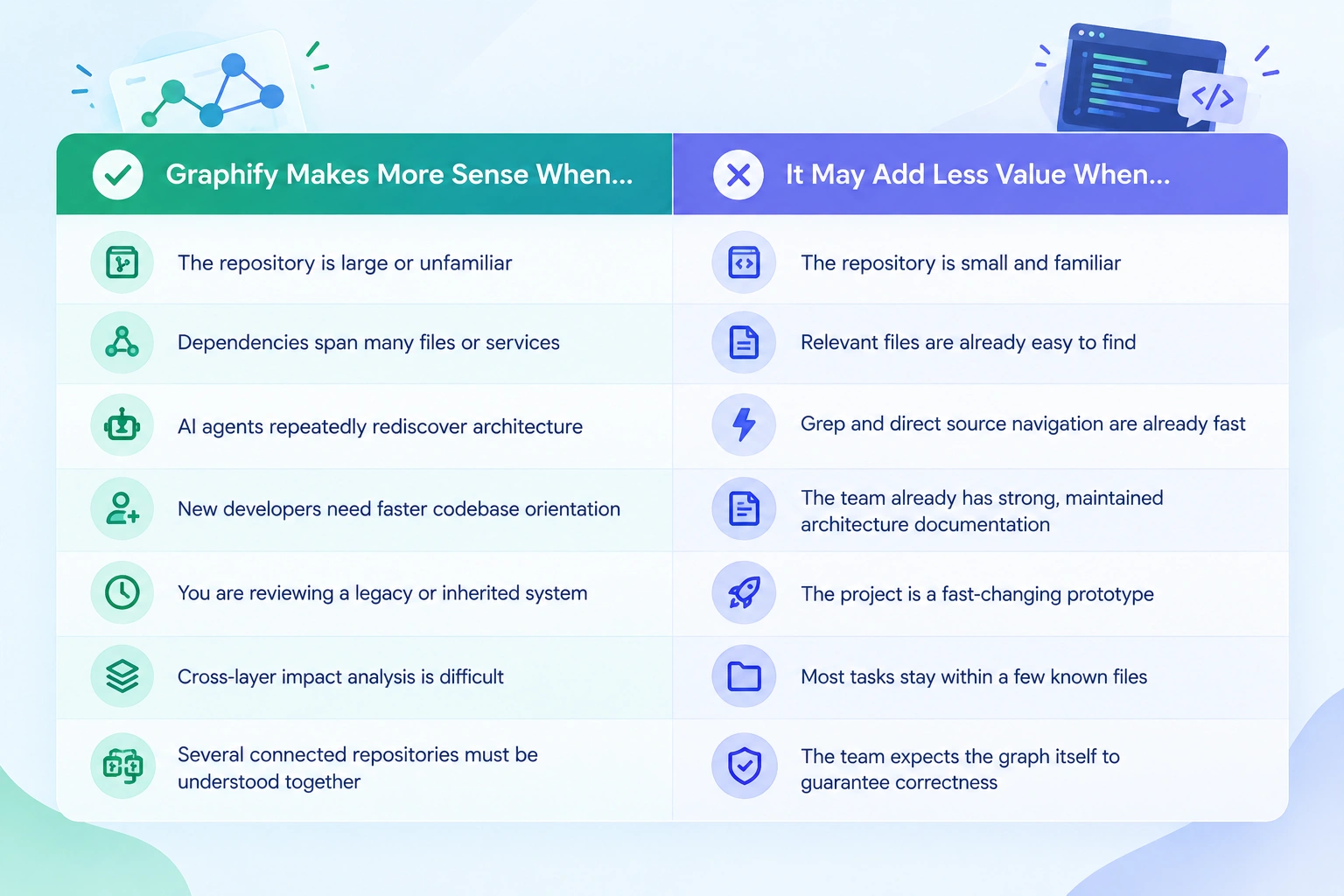
On a small or familiar codebase, Claude Code, Grep, or ordinary repository search may already reach the right files quickly. In that situation, building and maintaining a knowledge graph can add more overhead than value.
On a large or unfamiliar repository, the economics change. Repeatedly tracing dependencies, services, schemas, and cross-file relationships can consume a significant amount of context before the agent even starts solving the actual task.
RoboRhythms argues that Graphify becomes more compelling on larger repositories and reports a much stronger payoff once the codebase reaches hundreds of files.
That matches the broader pattern from hands-on reviews: Graphify’s token advantage is not simply a property of the tool—it depends on how expensive repository discovery was in the first place.
So the better question is not:
“How many tokens can Graphify save?”
It is:
“How much context does your coding agent currently waste rediscovering the same repository structure?”
The more expensive that repeated discovery becomes, the stronger Graphify’s case tends to be.
What Graphify Does Well
The strongest case for Graphify is not that it replaces normal repository search. It is that it can expose relationships and architectural patterns that are harder to see through file-by-file navigation alone.
That advantage becomes most noticeable when a developer or coding agent is entering an unfamiliar repository and needs to understand how the system is organized before making changes.
Codebase and Architecture Exploration
In Kevin Kinnett’s hands-on test, Graphify’s most useful output was architectural rather than task-specific. He found the graph helpful for identifying central files, natural code clusters, duplication, and areas where architectural sprawl might be emerging.
This is where a graph can provide information that ordinary grep cannot easily summarize. Instead of only answering “Where does this symbol appear?”, Graphify can help reveal questions such as:
Which files sit at the center of the application?
Which parts of the repository form distinct communities?
Where do multiple subsystems connect?
Which dependencies cross architectural boundaries?
Which nodes appear unusually connected?
For architecture reviews, refactoring preparation, or initial repository orientation, that structural view can be genuinely useful.
Large and Unfamiliar Repository Orientation
Graphify becomes more compelling as repository complexity grows.
Kinnett specifically noted that he would rather have a credible community map and a view of highly connected nodes when entering a large unfamiliar codebase than start with a massive flat search result. He identified onboarding, large-repository orientation, and architecture review as areas where the approach makes sense.
InfoQ reports a similar pattern in developer feedback. Graphify has attracted interest for large-scale repository orientation, onboarding, and architectural analysis, while day-to-day value appears more mixed on mid-sized projects where normal navigation may already be fast enough. (infoq.com)
That makes Graphify particularly relevant for situations such as:
joining an unfamiliar or inherited project;
exploring a legacy application;
understanding a multi-language or multi-service repository;
reviewing architectural boundaries before refactoring; and
helping a coding agent orient itself before working across several subsystems.
Structural Context for AI Coding Agents
For an AI coding assistant, Graphify’s most meaningful advantage is that it can provide structured context before broad repository exploration begins.
A coding agent normally has to discover architecture indirectly by reading files, following imports, searching for symbols, and reconstructing dependencies. Graphify attempts to move some of that work into a reusable repository map.
InfoQ describes the tool as moving AI coding workflows away from linear file browsing and token-heavy search toward structured graph navigation, with support for cross-file relationships and community-level context. (infoq.com)
The practical benefit is therefore not simply “more context.” It is a potentially better-targeted context.
Graphify can help an agent answer where to look first, which files are related, and which paths deserve closer inspection before the agent reads the underlying source. For large or unfamiliar systems, that can make the early stages of repository understanding more focused.
Where Graphify Still Falls Short
Graphify’s core idea is strong, but the hands-on reviews show that its value depends heavily on graph freshness, integration quality, and signal-to-noise ratio. These are not reasons to dismiss the tool, but they are important considerations before making it part of a daily development workflow.
Keeping the Graph Fresh
A knowledge graph is only useful if it reflects the current state of the repository.
As code changes, new files are added, imports shift, and dependencies evolve, the graph can become outdated unless it is refreshed. Kevin Kinnett specifically identified automatic graph freshness as one of the things Graphify would need to handle more seamlessly before he would rely on it in everyday work. (kevinkinnett.com)
That creates a practical tradeoff:
persistent repository context is valuable, but only if maintaining that context does not become another manual task.
For fast-moving projects, teams need a reliable way to rebuild or update the graph through watch workflows, Git hooks, or other automation. Otherwise, a stale graph can point a coding agent toward relationships that no longer match the source code.
Graphify’s Claude Code integration is designed to improve repository navigation, but hands-on testing shows that the integration layer can introduce its own problems.
In Kinnett’s test, the graph was generated successfully, but GRAPH_REPORT.md was blank. Because the Claude Code hook was configured to direct Claude toward that report before broad search operations, the integration ended up pointing the agent toward an artifact that was not providing useful context.
RoboRhythms also documented a separate compatibility issue where changes to Claude Code altered how Grep and Glob operations behaved, which affected assumptions built into Graphify’s PreToolUse workflow at the time of testing. (roborhythms.com)
The broader lesson is that Graphify does not operate in isolation. Its usefulness can depend on the behavior of external coding agents, hooks, and tool APIs that may change over time.
Graph Results Are Not Always High-Signal
More structural information does not automatically mean better context.
RoboRhythms reports that some repositories can produce noisy communities or broad graph outputs, particularly when many files share generic dependencies. In those cases, the graph may still require interpretation before it becomes useful to either a developer or an AI coding assistant. (roborhythms.com)
Large query responses can also work against the goal of reducing context usage if the agent receives more graph data than it actually needs.
That is why Graphify should be treated as a navigation and context layer, not as the final authority on the codebase.
The source code still matters. Critical implementation details, runtime behavior, and the impact of a proposed change should be verified against the actual repository rather than inferred from the graph alone.
Is Graphify Private Enough for Proprietary Code?
Graphify can be used with proprietary code, but its privacy model depends on which parts of the pipeline you enable.
For source code, Graphify uses Tree-sitter-based structural parsing locally, so a code-only graph can be generated without sending the repository to an external LLM. Wavect notes that this local parsing path can run offline, while RoboRhythms similarly reports that nothing leaves the machine during the Tree-sitter extraction pass.
The privacy boundary changes when optional semantic enrichment is used. Graphify can process documents, PDFs, images, or inferred relationships through a configured semantic backend or model provider. In those cases, some content may leave the machine and becomes subject to the data-handling policies of that provider.
Teams working with sensitive repositories should therefore review:
which files are included in the graph;
whether semantic enrichment is enabled;
which external model or backend receives content;
provider retention and regional data policies; and
how generated graph artifacts are stored and protected.
That last point matters because files such as graph.json and GRAPH_REPORT.md can reveal internal architecture, file paths, symbols, and relationships, even if the original source code remains local. Wavect recommends treating those outputs with the same care as other sensitive development artifacts.
So the safest summary is: Graphify’s structural code analysis can remain local, but not every optional workflow is automatically local or private. Teams using proprietary code should map the exact data path before enabling model-assisted enrichment.
Who Is Graphify Best For?
Graphify is most useful when repository understanding itself is a bottleneck. The larger and less familiar the codebase, the more valuable a persistent structural map can become.
Both Wavect and Kevin Kinnett point toward the same pattern: Graphify makes more sense for large repositories, onboarding, architecture exploration, takeover work, and cross-file dependency analysis than for small projects where direct search already works well.
Wavect specifically recommends piloting Graphify for large monorepos, connected repositories, onboarding, takeover, and due-diligence work, while suggesting that small familiar services with strong documentation may not justify the additional tooling.
Kevin Kinnett’s experience reinforces that distinction. On his mid-sized project, Graphify produced useful architectural insights, but Claude Code could still follow imports, search symbols, and reach the relevant files quickly enough that he did not consistently return to the graph during normal development.
So the better question is not simply “Is Graphify useful?” It is:
“Is repository discovery expensive enough in my workflow that maintaining a knowledge graph will save more time than it adds?”
For large or unfamiliar systems, the answer may be yes. For smaller codebases with strong documentation and efficient search, Graphify may provide less incremental value.
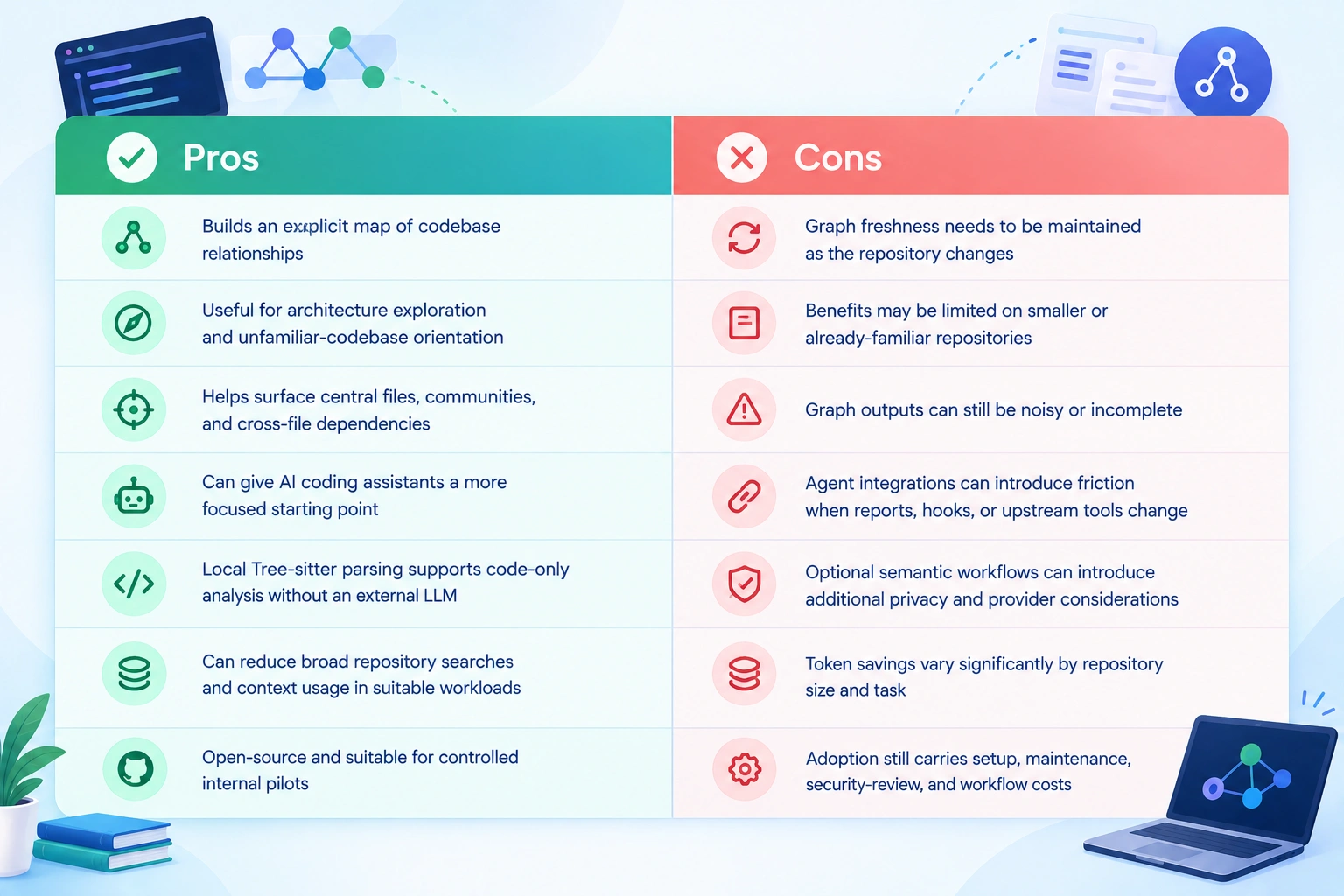
Graphify Pros and Cons
After looking at the hands-on reviews, Graphify’s strengths are clearest when repository structure is difficult to understand through ordinary search. Its tradeoffs mostly come from the extra graph layer that has to stay useful, current, and well integrated with the coding agent.
Kevin Kinnett’s experience captures the tradeoff well: Graphify produced genuine structural insights and useful graph queries, but it did not consistently outperform Claude Code’s normal navigation enough for him to rely on it during everyday development.
Wavect reaches a similar buyer-level conclusion: Graphify is worth piloting when teams repeatedly lose relationships across large or connected codebases, but adoption should be based on verified accuracy, completion time, reviewer effort, graph freshness, and maintenance cost, not on benchmark or token-saving claims alone.
So the pros and cons are highly context-dependent. Graphify becomes more compelling as codebase complexity and repository-discovery costs rise; it becomes less compelling when ordinary source navigation is already cheap and reliable.
Is Graphify Worth It?
Graphify is worth considering if repository understanding is a recurring bottleneck in your AI coding workflow. Its strongest case is not simply that it creates a visual graph, but that it can preserve structural relationships that an AI coding assistant might otherwise have to rediscover through repeated searches.
For large, unfamiliar, legacy, or highly connected codebases, that can be genuinely useful. Graphify can help surface architectural communities, central files, dependency paths, and cross-file relationships before the coding agent starts opening large numbers of files.
The hands-on evidence, however, also shows that Graphify is not automatically valuable for every repository. Kevin Kinnett found useful architectural insights in his test, but Claude Code’s normal navigation remained effective enough on his mid-sized project that Graphify did not become an essential part of his everyday workflow. Graphify can still help AI coding assistants navigate complex repositories and understand code relationships.
Graphify is more likely to be worth it when developers or AI agents repeatedly spend time reconstructing how a large codebase fits together.
Graphify may provide less incremental value when the repository is small, familiar, well documented, or already easy to navigate with direct search and coding-agent tools.
The other deciding factor is maintenance. A graph that becomes stale, noisy, or poorly integrated with the coding assistant can add friction instead of removing it. Teams should therefore evaluate Graphify using a real repository and measure whether it actually improves navigation time, task completion, context usage, and reviewer effort rather than judging it only by benchmark claims.
Overall, this Graphify codebase knowledge graph review suggests that the underlying approach solves a real problem, especially for complex repositories. Graphify is worth testing when relationship discovery is expensive—but its value depends heavily on codebase size, graph freshness, and how naturally it fits into the existing development workflow.
Graphify Alternative: Where Harmony Takes a Different Approach
Graphify and Harmony address a similar underlying problem: AI coding agents can waste time and tokens repeatedly rebuilding codebase context. Their approaches, however, are different.
Graphify focuses on creating an explicit codebase knowledge graph that developers and coding agents can query for architectural relationships, communities, dependencies, and paths. Harmony focuses more directly on persistent repository memory and task-specific context delivery for AI coding agents.
Harmony combines semantic search, symbol resolution, call graphs, imports, dependencies, and recent code changes inside a unified memory index. When an agent receives a prompt, Harmony retrieves and ranks the most relevant information instead of requiring the agent to repeatedly search the repository itself.
Reviewed Graphify? Now Try Harmony
Want your coding agent to remember the codebase instead of rediscovering it?
Harmony also uses Adaptive Context Expansion, starting with the smallest relevant context and following callers, callees, symbols, and dependencies only when additional information is required. Its token-budgeting layer then prioritizes the highest-value context that fits within the model's available context window.
The difference is therefore less about one tool replacing the other and more about how context reaches the coding agent.
Graphify is well suited to developers who want an inspectable knowledge graph for understanding repository architecture. Harmony is designed for developers who want their coding agent to retain repository memory and receive compact, task-specific context without repeatedly rediscovering the same files and relationships.
For teams where persistent agent memory, adaptive retrieval, and token-aware context delivery are the priority, Harmony is one of the strongest Graphify alternative to consider. It works through the Model Context Protocol (MCP) and currently supports workflows across Claude Code, Cursor, Windsurf, Codex, Gemini, VS Code, and other MCP-compatible coding agents.
FAQs About Graphify
What does Graphify do?
Graphify converts a codebase into a queryable knowledge graph that maps functions, classes, imports, calls, dependencies, and other relationships. It helps developers and AI coding assistants explore repository structure, trace paths, identify architectural communities, and narrow source-code searches.
Is Graphify free and open source?
Yes. Graphify is available as an open-source developer tool that can be installed locally through Python. Its CLI can analyze repositories, generate graph artifacts, and integrate with supported AI coding workflows. Teams should still account for setup, maintenance, and any external model costs used for optional semantic processing.
Does Graphify work with Claude Code?
Yes. Graphify supports Claude Code through instructions in CLAUDE.md, graph-generated context, and a PreToolUse-style hook designed to encourage graph-first repository exploration before broad Grep or Glob searches. Hands-on testing confirms the integration works, although report quality and upstream tool changes can affect the experience.
Does Graphify keep source code local?
Graphify’s Tree-sitter-based structural code parsing can run locally, so a code-only graph does not necessarily require sending source code to an external LLM. However, optional semantic enrichment or document-processing workflows may use a configured model provider, so teams should review the exact data path before using proprietary repositories.
Does Graphify really reduce token usage?
Graphify can reduce token usage by helping coding agents retrieve targeted structural context instead of repeatedly scanning large portions of a repository. Published examples range from roughly 67–73% context reduction to a separate large-repository case showing about 123K versus 1.7K tokens. These are benchmark examples, not guaranteed results for every project.
What is a good Graphify alternative for AI coding agents?
Harmony is a Graphify alternative for teams that prefer persistent repository memory and task-specific context retrieval. Harmony combines semantic search, symbol resolution, call graphs, imports, dependencies, recent changes, adaptive context expansion, and token-aware retrieval through MCP-compatible coding workflows.
Key Takeaways
4 essential insights
Use Graphify to trace cross-file dependencies, not just find symbols quickly.
Adopt Graphify for large repositories where relationship context otherwise costs tokens.
Keep the graph fresh; stale or noisy outputs still require source verification.
Evaluate setup and integration friction; smaller codebases may see limited gains.
Written by
Paul Dhaliwal
Founder & Chief Executive Officer
Paul Dhaliwal is a tech innovator and Founder of CodeConductor, an open-source no/low-code platform. With 10+ years of experience in AI and scalable development, Paul focuses on crafting intelligent solutions that drive real-world value. A firm believer in the mantra "Eat, Sleep, Code, Repeat," he balances his passion for software with a love for travel and family.
⚡
Build your app
No coding. No designers. Just describe what you want and watch AI build it.